
You’re running ads on Facebook, sending newsletters, and posting on LinkedIn. Traffic is coming in—but from where exactly? Which campaign is actually driving results?
UTM parameters answer these questions. They’re simple tags you add to URLs that tell your analytics exactly where each visitor came from. No cookies required. No complex tracking setup. Just clean, reliable campaign data.
In this guide, I’ll explain how UTM parameters work, when to use each one, and how to build a system that gives you clear marketing attribution—all while respecting user privacy.
What Are UTM Parameters?
UTM parameters (Urchin Tracking Module) are tags added to the end of URLs to track traffic sources. When someone clicks a link with UTM parameters, those values are captured by your analytics tool.
Here’s a basic example:
https://example.com/landing-page?utm_source=facebook&utm_medium=paid&utm_campaign=spring-saleThis URL tells your analytics:
- Source: Facebook
- Medium: Paid advertising
- Campaign: Spring sale promotion
When a visitor arrives via this link, you’ll see exactly which marketing effort brought them—even weeks later when they convert.
Why UTM Parameters Matter
Without UTM tracking, your analytics shows traffic from “facebook.com” or “email” as a generic bucket. You can’t distinguish between:
- Your organic Facebook posts vs. paid ads
- Different email campaigns
- Various influencer partnerships
- A/B test variations
UTM parameters solve this by giving you granular control over attribution. Every link can carry specific metadata about its origin.
The Five UTM Parameters
There are five standard UTM parameters. Three are commonly used; two are optional for advanced tracking.

utm_source (Required)
Identifies where the traffic comes from—the platform, website, or publication.
Examples:
utm_source=googleutm_source=facebookutm_source=newsletterutm_source=partner-blog
Best practice: Use lowercase, consistent naming. “Facebook” and “facebook” will appear as separate sources in reports.
utm_medium (Required)
Describes the marketing channel type—how the traffic reaches you.
Common values:
utm_medium=cpc— Cost per click (paid search)utm_medium=paid— Paid advertisingutm_medium=social— Organic social mediautm_medium=email— Email campaignsutm_medium=referral— Partner/affiliate linksutm_medium=display— Banner ads
Best practice: Stick to a predefined list of mediums. This keeps your reports clean and comparable.
utm_campaign (Required)
Names the specific campaign, promotion, or initiative.
Examples:
utm_campaign=spring-sale-2024utm_campaign=product-launchutm_campaign=weekly-newsletter-jan-15utm_campaign=black-friday
Best practice: Make campaign names descriptive and include dates when relevant. “promo1” tells you nothing six months later.
utm_term (Optional)
Tracks keywords for paid search campaigns. Originally designed for Google Ads.
Examples:
utm_term=privacy+analyticsutm_term=plausible+alternative
Note: For Google Ads, auto-tagging (gclid) often replaces manual utm_term tracking. This parameter is more useful for other paid search platforms.
utm_content (Optional)
Differentiates similar content or links within the same campaign—useful for A/B testing.
Examples:
utm_content=header-linkvsutm_content=footer-linkutm_content=blue-buttonvsutm_content=green-buttonutm_content=image-advsutm_content=text-ad
Best practice: Use this parameter when you have multiple links pointing to the same destination within one campaign.
UTM Parameters and Privacy
Here’s why UTM tracking works perfectly with privacy-first analytics: UTM parameters don’t require cookies.
The tracking data is embedded in the URL itself. When someone clicks your link, the parameters are sent as part of the page request. Your analytics tool reads them server-side—no client-side storage needed.
This means:
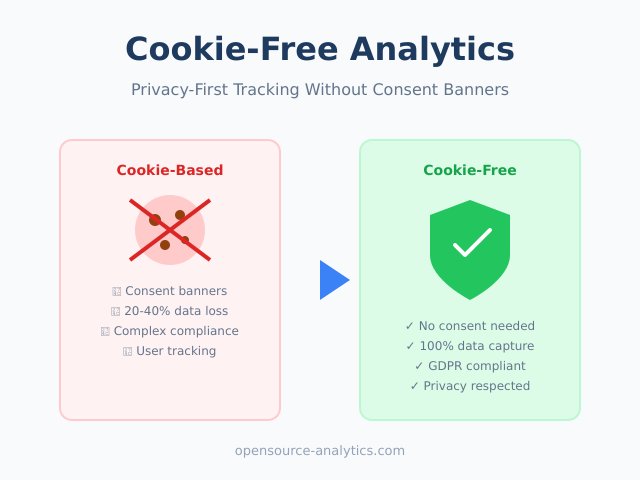
- No cookie consent required for UTM tracking
- Works even when cookies are blocked
- No cross-site tracking involved
- Data stays first-party
Privacy-first tools like Plausible, Fathom, and Umami all support UTM parameter tracking out of the box. For more on how these tools handle privacy, see my guide to GDPR compliance in analytics tools.
Building UTM URLs
You can add UTM parameters manually, but it’s error-prone. Use a URL builder instead.
Manual Construction
Start with your destination URL, add a ?, then chain parameters with &:
https://yoursite.com/page?utm_source=facebook&utm_medium=paid&utm_campaign=spring-saleRules:
- First parameter uses
? - Additional parameters use
& - No spaces (use
+or-or_) - URL-encode special characters
URL Builder Tools
These tools generate properly formatted UTM URLs:
- Google Campaign URL Builder — Free, widely used
- UTM.io — Team collaboration features, link management
- Bitly — URL shortening plus UTM building
- Spreadsheet template — Create your own for consistency
Most privacy-first analytics dashboards also show you exactly how to tag URLs for their specific implementation.
UTM Naming Conventions
Consistent naming is critical. Without standards, you’ll end up with:
- “Facebook” and “facebook” and “fb” as three different sources
- “email” and “Email” and “newsletter” meaning the same thing
- Campaigns you can’t identify because names are cryptic
Recommended Standards
Case: Always lowercase. Most analytics tools treat “Facebook” and “facebook” as different values.
Separators: Use hyphens (-) for readability. Avoid spaces, underscores work but hyphens are cleaner in reports.
Source naming:
| Platform | Recommended Source |
|---|---|
| Facebook/Meta Ads | facebook |
| Google Ads | google |
linkedin |
|
| Twitter/X | twitter |
| Email newsletter | newsletter |
| Partner website | partner-name |
Medium naming:
| Channel Type | Recommended Medium |
|---|---|
| Paid search ads | cpc or paid-search |
| Paid social ads | paid-social |
| Organic social | social |
| Email campaigns | email |
| Display/banner ads | display |
| Affiliate links | affiliate |
| Referral/partner | referral |
Campaign naming format:
[type]-[description]-[date/version]

Examples:
promo-black-friday-2024
launch-new-feature-jan
webinar-analytics-101
newsletter-weekly-0115
Common UTM Mistakes
Avoid these pitfalls that undermine your tracking:
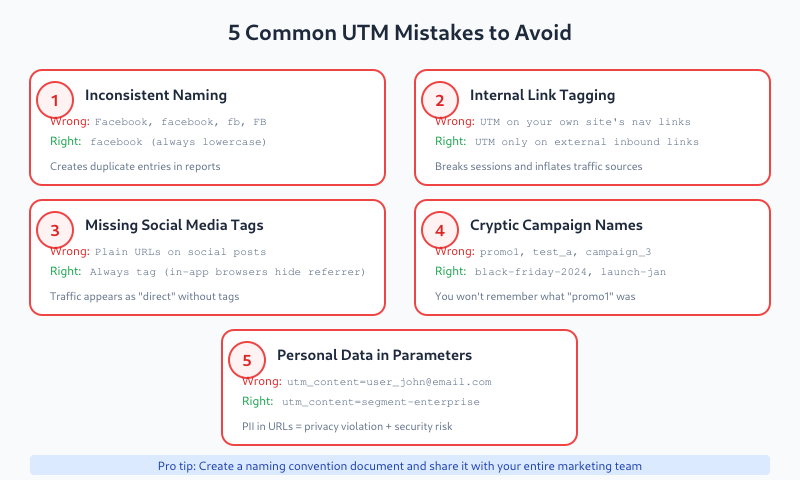
Inconsistent Naming
Problem: Using “Facebook,” “facebook,” “fb,” and “FB” interchangeably.
Result: Your traffic is split across multiple source entries, making analysis difficult.
Solution: Create a naming convention document and share it with your team. Use a URL builder that enforces standards.
Using UTM for Internal Links
Problem: Adding UTM parameters to links within your own website.
Result: Each internal link click creates a new “session” from that source, breaking your funnel data and inflating external traffic numbers.
Solution: Only use UTM parameters for external links pointing to your site. Never tag internal navigation.
Forgetting Mobile Apps
Problem: Traffic from in-app browsers (Facebook, LinkedIn, Twitter apps) often strips or modifies referrer data.
Result: Without UTM tags, this traffic appears as “direct” or shows the app’s user-agent instead of the source.
Solution: Always use UTM parameters for social media links, even organic posts. Don’t rely on automatic referrer detection.
Overly Complex Parameters
Problem: Creating hyper-specific campaigns for every minor variation.
Result: Reports become unusable with hundreds of tiny campaign entries.
Solution: Use utm_content for variations within a campaign, not separate campaign names. Balance granularity with usability.
Exposing Sensitive Data
Problem: Including user IDs, email addresses, or other personal data in UTM parameters.
Result: Personal data ends up in analytics, browser history, shared links, and server logs. Privacy and security risk.
Solution: Never include personally identifiable information in URLs. UTM parameters should describe the campaign, not the user.
Real-World UTM Examples
Here’s how to tag common marketing scenarios:
Facebook Ad Campaign
https://yoursite.com/landing?utm_source=facebook&utm_medium=paid-social&utm_campaign=spring-sale-2024&utm_content=carousel-adEmail Newsletter
https://yoursite.com/blog-post?utm_source=newsletter&utm_medium=email&utm_campaign=weekly-digest-jan-20LinkedIn Organic Post
https://yoursite.com/article?utm_source=linkedin&utm_medium=social&utm_campaign=thought-leadershipGoogle Search Ad
https://yoursite.com/pricing?utm_source=google&utm_medium=cpc&utm_campaign=brand-terms&utm_term=yourcompany+pricingPartner/Affiliate Link
https://yoursite.com/signup?utm_source=partner-techblog&utm_medium=referral&utm_campaign=affiliate-q1A/B Test Variants
Version A:
https://yoursite.com/page?utm_source=facebook&utm_medium=paid-social&utm_campaign=test-jan&utm_content=headline-a

Version B:
https://yoursite.com/page?utm_source=facebook&utm_medium=paid-social&utm_campaign=test-jan&utm_content=headline-b
UTM Tracking in Privacy-First Tools
Here’s how popular privacy-first analytics platforms handle UTM data:
Plausible
Plausible automatically captures all five UTM parameters. View them under:
- Sources — Shows utm_source breakdown
- Campaigns — Dedicated campaign report with medium, term, content
Plausible also tracks referrer data automatically, so you get source information even without UTM tags for organic links.
Fathom
Fathom captures UTM parameters and displays them in the referrers section. You can filter by:
- Source
- Medium
- Campaign
Fathom combines UTM data with referrer information for a complete picture of traffic sources.
Umami
Umami supports UTM tracking through its query parameter capture. Access campaign data via:
- Referrers report
- Custom event filtering
Self-hosted Umami users can also access raw data for custom analysis.
Matomo
Matomo offers the most detailed UTM reporting:
- Dedicated Campaigns section
- Source, medium, keyword, content breakdown
- Campaign attribution over time
- Custom campaign dimensions
Matomo can also use its own campaign parameters (pk_campaign, pk_source) as alternatives to UTM.
For a detailed comparison, see my Matomo vs Plausible vs Fathom analysis.
UTM Management for Teams
When multiple people create UTM links, consistency becomes challenging. Here’s how to maintain order:
Centralized URL Builder
Use a shared tool that enforces your naming conventions:
- Spreadsheet with dropdown menus for source/medium
- UTM.io or similar platform with team features
- Custom internal tool with validation
Documentation
Create a living document that defines:
- Allowed sources and their exact spelling
- Medium categories and when to use each
- Campaign naming format
- Examples for common scenarios
Link Audit
Periodically review your analytics for:
- Duplicate sources with different spellings
- Unknown or undefined mediums
- Campaigns that don’t follow the naming convention
Clean up historical data where possible, and use findings to update your documentation.
Bottom Line
UTM parameters are essential for marketing attribution—and they work perfectly with privacy-first analytics. No cookies, no consent issues, no complex setup. Just clear, reliable data about where your traffic comes from.
Key takeaways:
- Use all three required parameters: source, medium, campaign
- Establish naming conventions and enforce them across your team
- Never use UTM parameters on internal links
- Tag all external links, especially social media (in-app browsers break referrer data)
- Keep personal data out of UTM parameters
Start simple. Tag your most important campaigns first—paid ads, email newsletters, key partnerships. Once you see the value of granular attribution, you’ll naturally expand your tagging practice.
The few minutes spent adding UTM parameters will save hours of guesswork about what’s actually driving your results.