Your analytics show 10,000 visitors last month. But how many were actual humans? The answer might surprise you—and disappoint you.
Bot traffic accounts for nearly half of all internet traffic. Some bots are helpful (like search engine crawlers), but many are not. Scrapers, spam bots, and malicious crawlers can inflate your pageviews, skew your metrics, and make your data unreliable.
For privacy-first analytics users, bot detection presents a unique challenge. Without cookies or fingerprinting, how do you separate humans from machines? In this guide, I’ll explain how bot traffic affects your data, how privacy-respecting tools handle it, and what you can do to get cleaner metrics.
What Is Bot Traffic?
Bot traffic refers to any website visits generated by automated software rather than human users. Bots are programs that perform repetitive tasks—some legitimate, others harmful.
The scale is significant. According to industry reports, bots generate 40-50% of all web traffic. For smaller websites, this percentage can be even higher because you have fewer human visitors to dilute the bot noise.
Good Bots vs Bad Bots
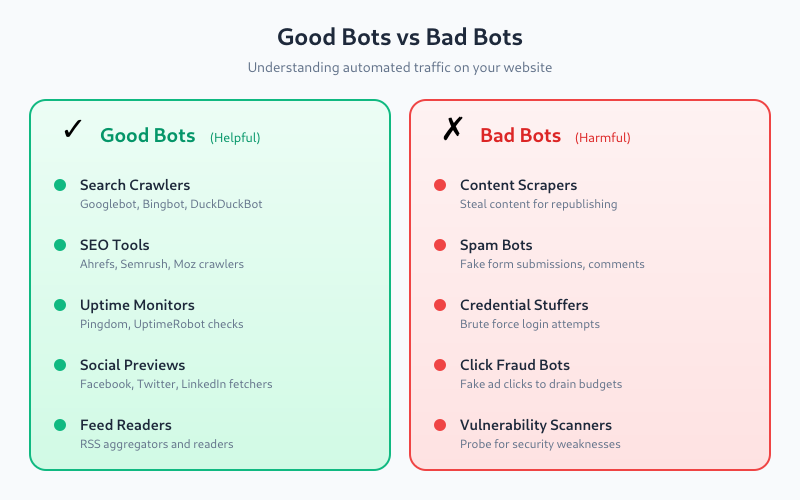
Not all bots are problematic. Here’s how they break down:

Good bots (you want these):
- Search engine crawlers — Googlebot, Bingbot, DuckDuckBot index your content
- SEO tools — Ahrefs, Semrush, Moz crawl for backlink analysis
- Uptime monitors — Pingdom, UptimeRobot check if your site is online
- Feed readers — RSS aggregators fetch your content
- Social media previews — Facebook, Twitter, LinkedIn fetch metadata for link previews
Bad bots (you don’t want these):
- Scrapers — steal your content for republishing
- Spam bots — submit fake form entries, comments
- Credential stuffers — attempt login with stolen passwords
- DDoS bots — overwhelm your server with requests
- Click fraud bots — fake ad clicks to drain budgets
- Vulnerability scanners — probe for security weaknesses
How Bot Traffic Affects Your Analytics
When bots aren’t filtered properly, they contaminate your data in several ways:
Inflated Pageviews and Sessions
A single scraper bot can generate hundreds of pageviews in minutes. If your analytics counts these as real visits, your traffic numbers become meaningless. You might think a blog post is performing well when it’s actually just being scraped.
Skewed Geographic Data
Many bots operate from data centers in specific regions. You might see unusual spikes from countries where you have no real audience—often the US, Germany, or Singapore where cheap cloud hosting is common.
Distorted Behavior Metrics
Bots behave differently than humans:
- Bounce rate — may be artificially high (bot visits one page and leaves) or low (bot crawls multiple pages)
- Session duration — often zero seconds or impossibly long
- Pages per session — either 1 (quick scrape) or unusually high (full crawl)
Broken Conversion Funnels
If bots enter your funnel data, conversion rates become unreliable. You can’t optimize what you can’t measure accurately.
False Traffic Patterns
Bots often run on schedules—every hour, every day at midnight, etc. This creates artificial patterns that obscure real user behavior trends.
How Privacy-First Analytics Tools Handle Bots
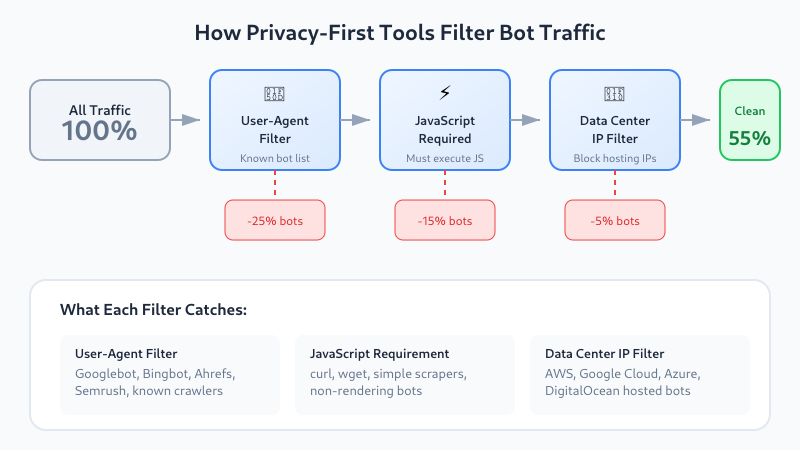
Privacy-respecting analytics tools can’t use the same aggressive fingerprinting techniques that traditional analytics employ. Instead, they rely on these methods:
User-Agent Filtering
Every HTTP request includes a User-Agent string identifying the client. Legitimate bots typically identify themselves:
Mozilla/5.0 (compatible; Googlebot/2.1; +http://www.google.com/bot.html)
Mozilla/5.0 (compatible; bingbot/2.0; +http://www.bing.com/bingbot.htm)
Mozilla/5.0 (compatible; AhrefsBot/7.0; +http://ahrefs.com/robot/)
Privacy-first tools maintain lists of known bot User-Agents and exclude them from reports. This catches most legitimate crawlers but misses bots that disguise themselves as regular browsers.
IAB Bot List
The Interactive Advertising Bureau (IAB) maintains a standardized list of known bots and spiders. Many analytics tools reference this list to filter automated traffic. It’s regularly updated and covers hundreds of known bot signatures.
JavaScript Execution Requirement
Most privacy-first analytics tools (Plausible, Fathom, Umami) require JavaScript execution to register a pageview. This automatically filters out:
- Simple HTTP scrapers that don’t render JavaScript
- curl/wget-based bots
- Many older or basic crawlers
However, sophisticated bots using headless browsers (Puppeteer, Playwright) can execute JavaScript and slip through.
Behavioral Heuristics
Some tools apply basic behavioral rules:
- Exclude hits with no referrer AND direct landing on deep pages
- Flag sessions with impossibly fast page transitions
- Identify patterns like sequential URL crawling
Bot Filtering by Tool
Here’s how popular privacy-first analytics platforms handle bot traffic:
| Tool | User-Agent Filtering | IAB List | JS Required | Additional Methods |
|---|---|---|---|---|
| Plausible | Yes | Yes | Yes | Data center IP filtering |
| Fathom | Yes | Yes | Yes | Aggressive bot detection |
| Umami | Yes | Partial | Yes | Configurable filters |
| Matomo | Yes | Yes | Optional | Device detection, custom rules |
| GoatCounter | Yes | No | No* | Basic bot patterns |
*GoatCounter can work without JavaScript via tracking pixel, which may count more bots.
For a deeper comparison of these tools, see my Matomo vs Plausible vs Fathom analysis.
Plausible’s Approach
Plausible filters bots at multiple levels:
- Known bot User-Agents are rejected immediately
- Requests from known data center IP ranges are excluded
- The tracking script must execute JavaScript
- Requests without proper headers are dropped
Plausible claims to filter out most automated traffic, though some sophisticated bots still get through.
Fathom’s Approach
Fathom is particularly aggressive about bot filtering. They’ve stated publicly that they continuously update their detection methods and err on the side of excluding suspicious traffic. This means your numbers might be slightly lower than other tools, but they’re likely more accurate.
Matomo’s Approach
Matomo offers the most configurability. In the admin panel, you can:
- Enable/disable bot filtering entirely
- View bot traffic separately in reports
- Add custom User-Agent patterns to block
- Exclude specific IP ranges
- Use the Device Detector library for advanced identification
This flexibility is valuable for self-hosted users who want fine-grained control.
Signs You Have a Bot Problem
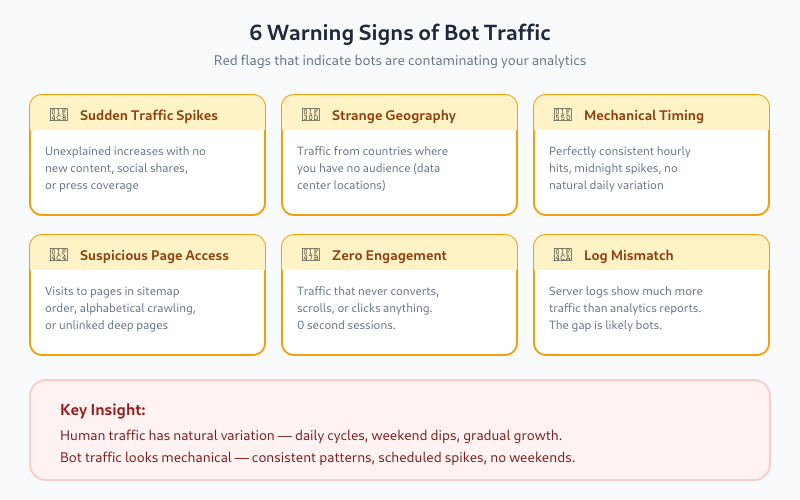
How do you know if bots are contaminating your data? Look for these red flags:
1. Unusual Traffic Spikes
Sudden traffic increases with no apparent cause (no new content, no social shares, no press coverage) often indicate bot activity. Real traffic grows gradually or correlates with specific events.
2. Strange Geographic Distribution
If you’re a local business in France but suddenly see 40% of traffic from Singapore or Virginia (US), that’s suspicious. Major cloud providers host servers in these regions, making them common bot origins.
3. Abnormal Time Patterns
Human traffic follows predictable patterns—higher during business hours, lower at night, weekly cycles. Bot traffic often shows:
- Perfectly consistent hourly hits
- Spikes at exactly midnight UTC
- No weekend drop-off
4. Suspicious Page Patterns
Bots often:
- Visit pages in alphabetical or sitemap order
- Hit every page on your site systematically
- Access pages that aren’t linked anywhere (only in sitemap)
- Target specific file types (PDFs, images)
5. Zero Engagement
Traffic that never converts, never scrolls, never clicks anything—that’s likely not human. Some engagement rate, even if low, indicates real users.
6. Mismatched Server Logs
Compare your analytics data with raw server logs. If server logs show significantly more requests than your analytics tool records, the difference is likely bots being filtered (good) or bots that don’t execute JavaScript (also filtered by most tools).
Manual Bot Detection Techniques
Beyond what your analytics tool does automatically, you can investigate further:
Check Your Server Logs
Raw access logs reveal what your analytics might hide. Look for:
# Common bot patterns in access logs
grep -i "bot\|crawler\|spider\|scraper" access.log
grep -i "python\|curl\|wget\|java" access.log
Legitimate bots usually identify themselves. Suspicious entries look like normal browsers but behave strangely.
Analyze Traffic by Hour
Export your hourly traffic data and look for patterns. Human traffic has natural variation. Bot traffic often looks mechanical—same volume every hour, or spikes at regular intervals.
Review Landing Pages
Which pages receive direct traffic (no referrer)? If deep, obscure pages get significant direct visits, bots might be crawling your sitemap systematically.
Check for Data Center IPs
If you have access to IP data (self-hosted Matomo, server logs), check whether traffic originates from residential IPs or data centers. Services like IPinfo.io can identify hosting providers. Real users rarely browse from AWS or Google Cloud servers.
Reducing Bot Traffic Impact
While you can’t eliminate all bot traffic, you can minimize its impact:
Use robots.txt Wisely
A well-configured robots.txt tells legitimate bots which pages to skip:
User-agent: *
Disallow: /admin/
Disallow: /private/
Disallow: /temp/

# Slow down aggressive crawlers
User-agent: AhrefsBot
Crawl-delay: 10
Note: Malicious bots ignore robots.txt entirely. It only works for bots that choose to respect it.
Implement Rate Limiting
At the server level, limit requests per IP address. This won’t stop distributed bots but catches simple scrapers:
# Nginx rate limiting example
limit_req_zone $binary_remote_addr zone=one:10m rate=10r/s;

location / {
    limit_req zone=one burst=20 nodelay;
}
Use a Web Application Firewall
Services like Cloudflare, Sucuri, or server-side solutions (ModSecurity) can identify and block malicious bots before they reach your analytics. Cloudflare’s free tier includes basic bot protection.
Block Known Bad Actors
If you identify specific problematic bots in your logs, block them at the server level:
# Nginx: Block specific User-Agents
if ($http_user_agent ~* (SemrushBot|MJ12bot|DotBot)) {
    return 403;
}
Be careful not to block legitimate crawlers you want (like Googlebot).
Filter in Your Analytics Tool
If your tool supports it, create filters or segments to exclude suspicious traffic:
- Matomo: Create segments excluding specific countries, IP ranges, or User-Agents
- Umami: Configure ignored IPs in settings
- Plausible: Use the API to filter reports by specific dimensions
The Privacy Trade-Off
Here’s the honest truth: privacy-first analytics will always be less effective at bot detection than invasive alternatives.
Google Analytics can use:
- Extensive fingerprinting
- Cross-site tracking data
- Machine learning on billions of data points
- Integration with reCAPTCHA signals
Privacy-respecting tools deliberately avoid these techniques. The trade-off is worth it—your data is cleaner ethically, even if slightly noisier statistically.
For most websites, the remaining bot traffic after basic filtering is small enough not to significantly impact decision-making. You’re looking for trends and patterns, not precise visitor counts. A 5% margin of bot noise doesn’t change whether your new landing page converts better than the old one.
When Bot Traffic Really Matters
Bot detection becomes critical in specific scenarios:
- Advertising: If you sell ads based on traffic, bot inflation is fraud
- Capacity planning: Bots consuming server resources affect infrastructure decisions
- Security: Vulnerability scanning bots indicate potential attack preparation
- Content theft: Scraper bots stealing your content for competitor sites
For general website analytics—understanding user behavior, measuring content performance, tracking conversions—privacy-first tools with standard bot filtering are sufficient.
Bottom Line
Bot traffic is unavoidable, but it doesn’t have to ruin your analytics. Privacy-first tools like Plausible, Fathom, and Matomo include reasonable bot filtering that catches most automated traffic without compromising user privacy.
Key takeaways:
- Expect 40-50% of raw web traffic to be bots—good filtering removes most of this
- JavaScript-based tracking automatically excludes simple bots
- Watch for red flags: traffic spikes, unusual geography, mechanical timing patterns
- Use server-level protections (rate limiting, WAF) as your first line of defense
- Accept that some bot noise will remain—focus on trends, not absolute numbers
The goal isn’t perfect bot detection. It’s getting data accurate enough to make good decisions. Privacy-first tools achieve this while respecting your visitors—a trade-off most website owners should happily accept.
For more on how these tools protect privacy while delivering useful insights, read my guide on cookie-free analytics and how it works.