
Most analytics tools assume you want complexity. Funnels, segments, custom dimensions, data pipelines. Simple Analytics is a deliberate rejection of that assumption. It does a small number of things and does them cleanly. Whether that trade-off works for you depends entirely on what you actually need from your data.
I’ve been running Simple Analytics alongside other privacy-first tools for a while now, and this simple analytics review reflects that hands-on experience — not a summary of the marketing page. The short version: it’s genuinely excellent for what it’s designed for, and genuinely wrong for anything outside that scope.
What Is Simple Analytics?
Simple Analytics is a commercial SaaS analytics platform based in the Netherlands. It was built with one explicit goal: give you visitor data without touching personal information or setting any cookies. Zero cookies — first-party or third-party. No IP addresses stored. No persistent identifiers of any kind.
The company is EU-based, which means your analytics data stays inside the EU by default. That’s not just a privacy-marketing claim; it’s a meaningful technical fact. When you keep analytics data in an EU jurisdiction, you sidestep the entire EU-to-US data-transfer adequacy question entirely — no need to worry about the current status of the EU-US Data Privacy Framework or any future legal challenge to it.
One thing to be clear about from the start: Simple Analytics is not open source and not self-hostable. You can’t pull the source code, inspect it, or run your own instance. If those are requirements for you, you’re looking at a different category of tool entirely — something like Umami, Matomo, or GoatCounter. I cover those trade-offs in my privacy-first analytics comparison.
The Dashboard: What You See and What You Don’t
When you log in to Simple Analytics, you get a single-page dashboard. That’s intentional. There’s no sidebar with 20 report types. No date-range selector with 47 options. You pick your date range, you see your numbers.
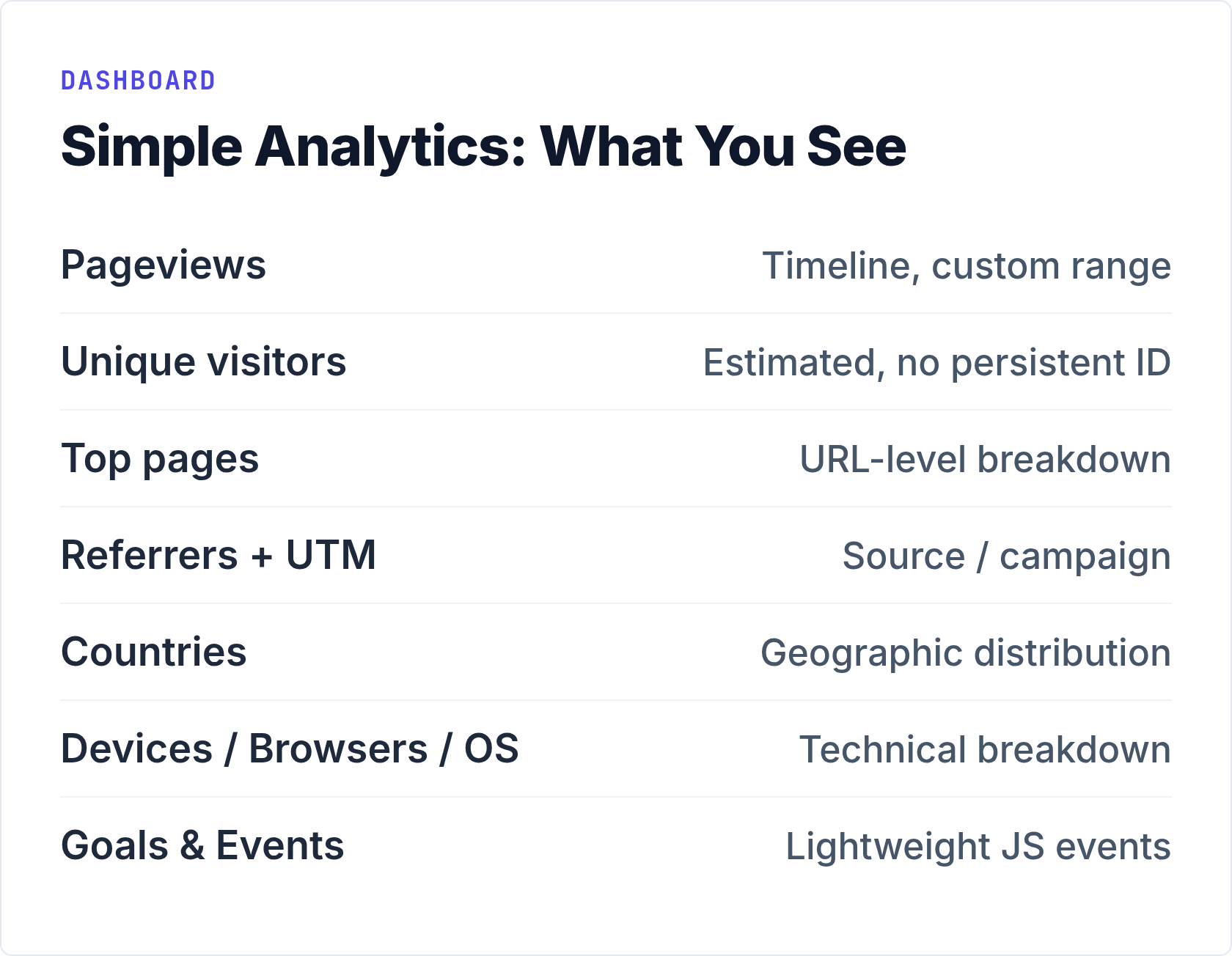
The dashboard shows:
- Pageviews and unique visitors — the core metrics, displayed as a clean timeline chart
- Top pages — which URLs are getting traffic
- Referrers — where visitors came from, including UTM campaign breakdowns
- Countries — geographic distribution of your audience
- Devices, browsers, operating systems — the standard technical breakdown
- Goals and events — lightweight event tracking you configure via their script
What you don’t see: user journeys, funnels, session recordings, heatmaps, cohort analysis, or any attribution modeling. That’s not a bug — it’s the product. Simple Analytics is a metrics dashboard, not an analytics platform in the enterprise sense.
When I tested the interface, the speed was immediately noticeable. The dashboard loads fast. Filtering by date range or referrer is instant. There’s no waiting for queries to process. For anyone who’s sat watching Matomo’s report queue churn through archived data, this feels like a different category of software.
Privacy Architecture: How the Cookie-Free Tracking Works
Simple Analytics collects data without setting any cookies and without storing IP addresses. Instead of assigning a persistent ID to each visitor, it uses a combination of factors to estimate unique visitors: the URL, referrer, user-agent string, and a time window. The result is an approximation, not a precise count. For most practical purposes — understanding traffic trends, identifying top content, seeing referral sources — that’s sufficient.
Because there’s no personal data involved, you don’t need a cookie consent banner. The ePrivacy Directive and GDPR both require consent mechanisms when you process personal data. No personal data means no consent required. That’s a genuine user experience advantage: visitors land on a clean page, not a consent overlay.
Simple Analytics explicitly documents compliance with GDPR, the ePrivacy Directive, UK GDPR, and PECR. For a deeper look at how the major privacy-first tools handle GDPR specifically — and how Simple Analytics compares to Plausible, Fathom, and Umami on that dimension — see my breakdown of privacy and GDPR compliance features across these tools.
I won’t rehash all of that here. The key point for this review: Simple Analytics’ privacy approach is solid and well-documented. The EU data residency is a genuine advantage over tools hosted in the US, even tools that claim GDPR compliance.
For more on the technical mechanics of how cookie-free analytics actually works, my article on cookie-free analytics — how it works and why it matters covers the underlying approach in detail.
Pricing: What You Actually Pay
Simple Analytics is not free. There’s no free tier. Pricing starts at €9/month, billed annually, and scales based on pageview volume. The billing model uses a slider and calculates charges on a three-month trailing average, which is a reasonable approach — a traffic spike in one month won’t immediately push you into a higher tier.
| Plan tier | Pageviews / month | Starting price |
|---|---|---|
| Starter | Up to 100k | €9/month |
| Business | Up to 1M+ | Higher tiers via slider |
| Enterprise | Custom volume | Custom pricing |
For current pricing across all tiers, check the Simple Analytics pricing page directly — they update it periodically and the slider is the most accurate way to see what your pageview volume costs.
The paid-only model is worth naming explicitly. If you run a personal blog at 5k pageviews a month, €9/month might feel steep compared to free open-source alternatives you can self-host. However, that comparison assumes you’re willing and able to maintain a server, keep a Docker stack updated, and deal with the occasional downtime. Simple Analytics is pricing partly against your time and operational overhead, not just against free tiers.
Getting Started: Setup Is Genuinely Simple
This is the one area where Simple Analytics’ name is fully accurate. Setup takes about three minutes.
- Create an account at simpleanalytics.com
- Add your website domain
- Paste a single script tag before the closing
</body>tag of your site - Verify the connection — data starts appearing immediately
The tracking script is lightweight. There are no configuration files, no database connections to set up, no server-side components. For WordPress sites, there’s a plugin. For static sites or custom builds, the script tag is all you need.
Event tracking requires a bit more work — you call their JavaScript API to fire events manually, or use their documentation to set up automated event collection from clicks on specific elements. It’s not as flexible as a full event taxonomy system, but it covers the common cases: button clicks, form submissions, outbound link clicks.
Who Should Use Simple Analytics?
Simple Analytics is genuinely excellent for a specific profile of user. That profile looks like this:
- Small to medium website owners who want to know traffic trends, top pages, and referral sources — and nothing more complicated than that
- Agencies or consultants managing multiple client sites who need a clean, shareable dashboard without exposing raw data or complex configurations
- EU-based businesses that need to demonstrate data residency in an EU jurisdiction for compliance reasons
- Non-technical users who need analytics to work reliably without server maintenance
- Content publishers who care about which articles get traffic and where readers come from, not about attribution modeling
If your analytics workflow is “I want to know if traffic went up or down, which pages are working, and where readers are coming from” — Simple Analytics covers that completely and cleanly.
Limitations to Consider
Being honest about limitations is the point of a real review. Simple Analytics has several that matter depending on your situation.
Not open source, not self-hostable. This is the most fundamental constraint. You cannot inspect the code. You cannot run your own instance. You’re trusting the company’s implementation of their privacy claims. For many users that’s a reasonable trust relationship — they’re a small Dutch company with a clear business model and a public track record. But “if you can’t inspect the code, it’s not really yours” is a principle that Simple Analytics cannot satisfy by definition.
Paid from day one. There’s no free tier for small sites or personal projects. If you’re running a low-traffic site and want to avoid server management, alternatives like GoatCounter’s hosted free tier or a self-hosted Umami instance on an existing VPS might be more practical.
Approximated unique visitors. Because there’s no persistent identifier, the unique visitor count is an estimate based on technical signals. For most traffic analysis purposes this is fine. For precise conversion tracking or cohort analysis, it’s not sufficient.
No funnels, no session replay, no heatmaps. If your analytics needs include understanding user journeys through a checkout flow, Simple Analytics isn’t the right tool. That’s not a criticism — it’s just outside the product’s scope. Tools like Matomo handle that kind of analysis, at the cost of considerably more complexity.
Single data export format. Data export exists, but it’s less flexible than platforms with full SQL access or API endpoints that let you query arbitrary date ranges and dimensions. For data-heavy teams who want to pipe analytics into a data warehouse, this is a real constraint.
Simple Analytics vs. the Alternatives: Quick Comparison
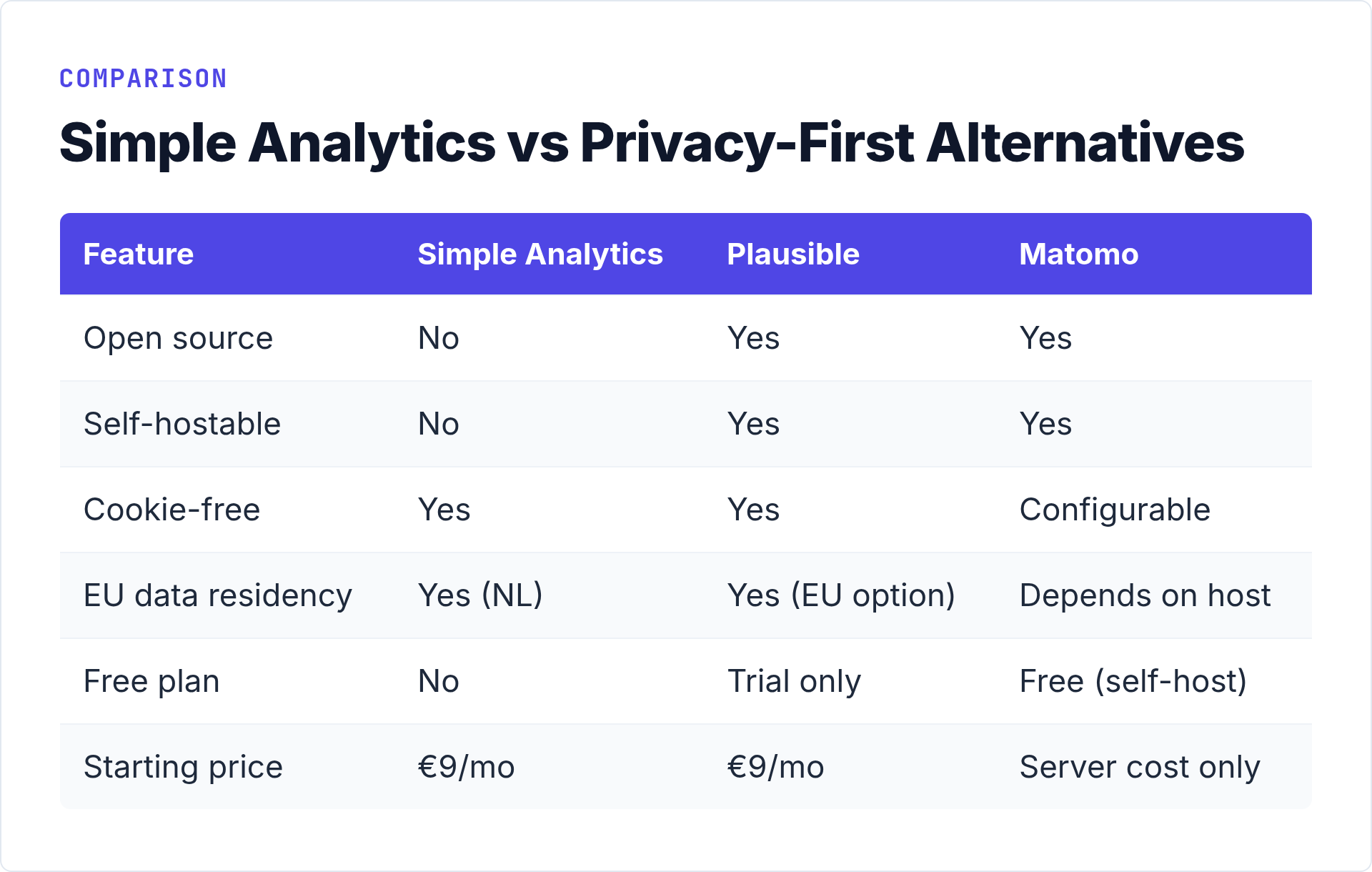
| Feature | Simple Analytics | Plausible | Umami (self-hosted) | Matomo (self-hosted) |
|---|---|---|---|---|
| Open source | No | Yes (AGPLv3) | Yes (MIT) | Yes (GPLv3) |
| Self-hostable | No | Yes | Yes | Yes |
| Cookie-free | Yes | Yes | Yes | Configurable |
| EU data residency | Yes (Netherlands) | Yes (EU option) | Depends on host | Depends on host |
| Free tier / free plan | No | 30-day trial | Free (self-host) | Free (self-host) |
| Funnels / user journeys | No | Limited | No | Yes |
| Setup complexity | Very low | Low | Medium (Docker) | High |
| Starting price | €9/month | €9/month | Server cost only | Server cost only |
Bottom Line
This simple analytics review lands where I expected it to after hands-on use: Simple Analytics is one of the most polished, lowest-friction privacy analytics products available. The dashboard is fast and uncluttered. The privacy implementation is legitimate, not just marketing. The EU data residency is a concrete compliance advantage. Setup takes minutes, not hours.
The trade-offs are equally clear. It’s proprietary software. You can’t self-host it. There’s no free tier. And it won’t help you with funnel analysis, session replay, or any of the deeper behavioral analytics that more complex tools provide.
If you want analytics that stays out of your visitors’ way and mostly stays out of your way too, Simple Analytics delivers on that promise consistently. If you need open-source code you can audit, or the ability to run everything on your own infrastructure, you’re looking at a different category — and that’s fine. There are excellent options in that category too.
The right question isn’t whether Simple Analytics is the best analytics tool. It’s whether it’s the right analytics tool for your specific situation. For a significant number of website owners — particularly in the EU, particularly those without server management bandwidth, particularly those who just want clean traffic data — the answer is yes.