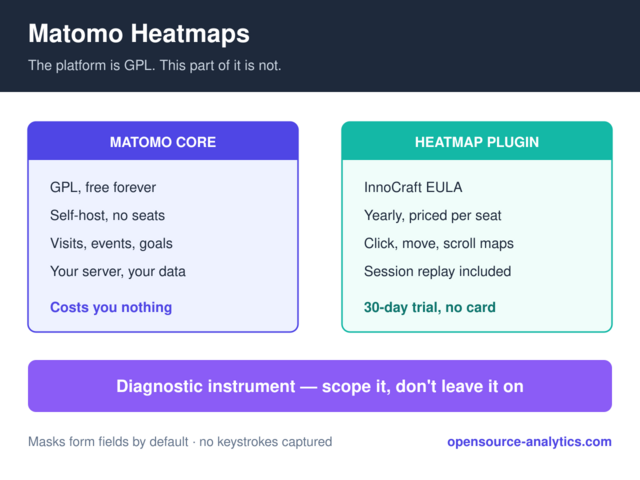
Matomo’s core is GPL. Its heatmaps are not. Heatmap & Session Recording is a premium plugin published under the InnoCraft EULA, sold as a yearly subscription, and that licence difference is the first thing to understand before you plan around it — because it changes what “self-hosted Matomo is free” means in practice.
What you get for the money is genuinely good, and the privacy defaults are stronger than anything the SaaS session-replay market ships. What you get for free, if you refuse to pay, is a different tool entirely.
What the plugin records
Two features share one plugin, and they answer different questions.
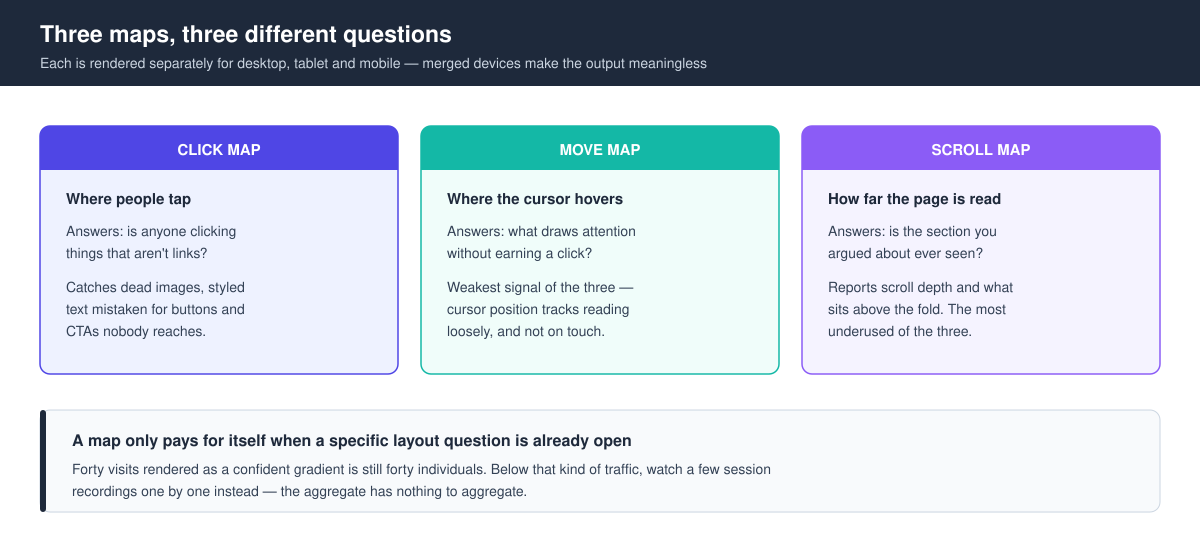
Heatmaps aggregate many visits into one picture. Per the plugin listing on the Matomo Marketplace, you get click maps, mouse-move (hover) maps, and scroll maps, rendered separately for desktop, tablet and mobile. The scroll map is the one most people underuse: it reports scroll depth and what sits above the fold, which is the only honest way to find out whether the section you argued about in a meeting is ever seen.
Session Recording keeps individual visits. It replays clicks, mouse movements, scrolls, window resizes, form interactions and page changes, alongside a summary of browser, OS, location and session length, with playback speed control and pause-skipping.
Device separation matters more than the feature list suggests. A click map that merges phone taps with desktop clicks is close to meaningless — the layouts don’t share coordinates. Matomo splitting them by device is what makes the output usable rather than decorative.
The licence is the part people miss
Matomo On-Premise is free software you install on your own server. The heatmap plugin is a commercial add-on to it, licensed under the InnoCraft EULA rather than the GPL that covers Matomo core. Practically:
- There is a 30-day trial, no credit card required.
- Pricing is tiered by number of users, from a small 1–4 band up to unlimited.
- Yearly billing is discounted 17% against monthly.
- The current plugin release requires Matomo 5.x — the listing pins it to
>=5.0.0-rc1,<6.0.0-b1.
I’m deliberately not printing a euro figure here. The tiers move, and a stale price in a guide is worse than no price — check the marketplace listing for what your user count costs today. What matters for planning is the shape: it is a recurring per-seat cost layered on top of a platform you adopted partly to stop paying recurring per-seat costs.
Buy it if the answer is worth the seats — just price the whole thing before you do. That is the same calculation the calculation we walk through for the platform as a whole in our self-hosted vs cloud analytics comparison.
What it costs your pages
The tracking side is not free either, in the load-time sense. Matomo’s developer documentation is explicit that an HTTP request is issued on each page view to determine whether that view needs to be recorded.
Read that carefully, because it is easy to misread as “a request per recorded session.” It is a request per page view, on every page view, whether or not anything gets recorded. On a site already careful about third-party weight — which describes most people who chose Matomo on purpose — that is a real line item, not a rounding error.
The mitigation is scoping. You configure which pages are tracked and how much gets recorded from the Heatmaps or Session Recordings management screens, so the sane pattern is to point it at the handful of pages where a layout question is actually open, run it until you have enough sessions to answer that question, then turn it off. Heatmaps are a diagnostic instrument. Leaving one running permanently across a whole site is the analytics equivalent of leaving an X-ray machine on.
What Matomo masks before it records
This is where the plugin earns its place on a privacy-first stack, and where it differs sharply from the SaaS replay tools it competes with.
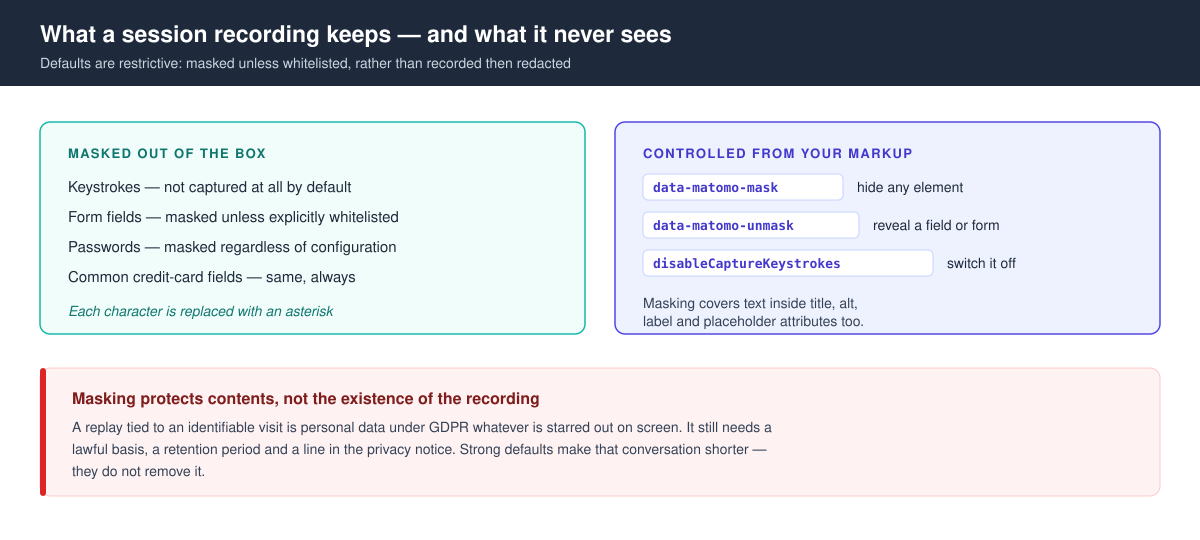
The defaults are restrictive rather than permissive. No keystrokes are captured by default. Form fields are masked unless you explicitly whitelist them — the opposite of the “record everything, redact later” posture that has produced most of the session-replay incidents of the last few years. Passwords and common credit-card fields stay masked no matter how you configure the rest.
Where you need finer control, the plugin reads attributes off your markup:
| What you want | How you do it |
|---|---|
| Mask any element’s content | data-matomo-mask — every character is replaced with *, and it covers text in title, alt, label and placeholder |
| Unmask a specific field | data-matomo-unmask on the input, or on the parent form to unmask the whole form |
| Re-mask one field inside an unmasked form | data-matomo-mask on that child element |
| Turn keystroke capture off entirely | _paq.push(['HeatmapSessionRecording::disableCaptureKeystrokes']); |
One caution that the documentation cannot give you: masking protects field contents, not the fact that a recording exists. A session replay tied to an identifiable visit is still personal data under GDPR, and it still needs a lawful basis, a retention period, and a line in your privacy notice. The masking defaults make that conversation easier. They do not remove it — the distinction we draw in legitimate interest versus consent for analytics applies here with more force than it does to plain page-view counting.
When a heatmap is worth running
Heatmaps answer layout questions and nothing else. Two conditions have to hold before one pays for itself.
You need a specific question the map can settle — whether a CTA below the fold is reached, whether people click something that isn’t a link, whether a long page loses everyone at the same section. “Let’s see how users behave” is not that question, and produces a pretty picture nobody acts on.
You also need enough traffic on the page for the aggregate to mean something. A click map built from forty visits mostly shows you the noise of forty individuals. If the page you care about gets that kind of traffic, the honest tool is a handful of session recordings watched one by one, or five minutes of user testing — not a heatmap that dresses a tiny sample in a confident gradient.
Against that, the case for buying is strong when you run a commercial site with real traffic, an ongoing layout argument, and a policy reason to keep behavioural data on infrastructure you control instead of shipping it to a replay vendor.
The open-source route: OpenReplay
If the licence is the sticking point rather than the money, there is a genuinely open alternative, though it solves a narrower problem.
OpenReplay is self-hostable session replay and product analytics. Its core, outside the ee/ directory, is AGPL v3; the tracker libraries are MIT, so embedding the tracker in a commercial application carries no copyleft obligation. Enterprise features — co-browsing, SCIM provisioning, SSO with custom IdP groups, video export of replays, some ClickHouse optimisations — sit under a proprietary enterprise licence.
The trade here is one of scope, not of licence terms. OpenReplay is a session-replay and product-analytics platform, deployed and maintained separately from Matomo. Matomo’s plugin is a feature inside the analytics install you already run, with heatmap aggregation Matomo does natively and OpenReplay approaches differently. Running OpenReplay means operating a second system: its own storage, its own upgrades, its own access control.
The AGPL is also worth reading rather than assuming. It extends copyleft to network use, so if you modify the core and expose it as a service, those modifications carry the same terms.
| Matomo Heatmap & Session Recording | OpenReplay | |
|---|---|---|
| Licence | InnoCraft EULA (proprietary) | AGPL v3 core, MIT tracker, proprietary EE |
| Cost model | Yearly subscription, tiered by users | Free to self-host; you pay in infrastructure and operations |
| Heatmaps | Click, move and scroll, split by device | Session replay is the primary artefact |
| Where it lives | Inside your existing Matomo | A separate system to deploy and maintain |
| Masking defaults | Restrictive — no keystrokes, fields masked unless whitelisted | Configurable; verify against your own policy before rollout |
| Fits when | You already run Matomo and want the answer this week | The licence matters more than the setup time |
Frequently asked questions
Are Matomo heatmaps free?
No. Matomo’s core analytics is free and GPL-licensed, but Heatmap & Session Recording is a premium plugin under the InnoCraft EULA, sold as a yearly subscription tiered by user count. A 30-day trial is available without a credit card.
Does Matomo session recording capture passwords?
No. Keystrokes are not captured by default, form fields are masked unless explicitly whitelisted, and passwords and common credit-card fields remain masked regardless of configuration. You can disable keystroke capture outright with disableCaptureKeystrokes.
Do heatmaps slow down my site?
They add an HTTP request on every page view, issued to decide whether that view should be recorded — not only on views that get recorded. Limit the plugin to the pages where you have an open layout question rather than running it site-wide.
Is there an open-source alternative to Matomo heatmaps?
OpenReplay is the closest, with an AGPL v3 core and an MIT tracker. It is a separate self-hosted platform focused on session replay rather than a plugin inside Matomo, so you trade licence freedom for a second system to operate.
How much traffic does a heatmap need?
Enough that the aggregate describes a pattern rather than a handful of individuals. There is no published threshold, and any map built from a few dozen visits is showing you individual behaviour with the visual confidence of a trend. At that volume, watch a few recordings instead.
Where to start
Write down the layout question first, then start the 30-day trial pointed at only the pages that can answer it. If the map settles the argument inside the trial, you have your answer about whether the subscription is worth renewing — and if it doesn’t, you have learnt something cheaper than a year of seats.
Either route assumes the install underneath is sized for the load. Adding recording traffic to a Matomo that is already struggling with archiving will surface as a performance problem you’ll blame on the wrong component — our guide to Matomo system requirements covers what that floor really looks like.