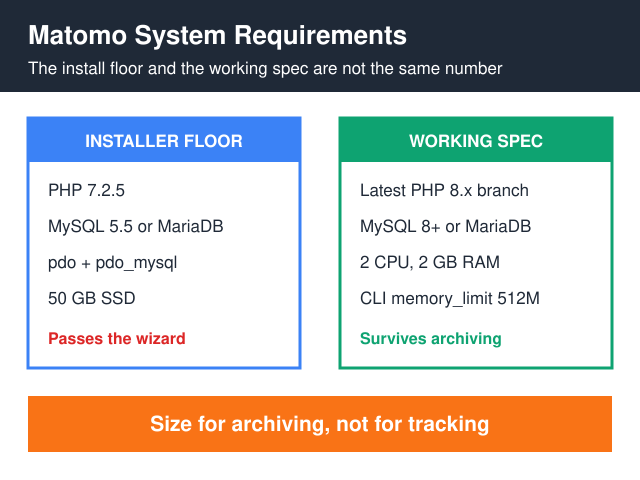
Matomo system requirements depend on the version you install. Matomo 5, the current stable line, needs PHP 8 and MySQL 5.5 or MariaDB.
Matomo 6 raises the bar to PHP 8.1 and MySQL 8.0 or MariaDB 10.6, per Matomo’s own requirements page.
Both versions need the pdo and pdo_mysql pair (or mysqli) and a web server such as Nginx or Apache.
For a site doing up to 100,000 pageviews a month, Matomo publishes 2 CPU cores, 2 GB of RAM and 50 GB of SSD.
That list gets you through the installer. The real constraint arrives later, when core:archive starts building reports over months of raw data.
Matomo requirements by version
Here’s the official line for both versions, with the PHP extension lists taken from Matomo’s own system check.
| Requirement | Matomo 4.16 and 5 | Matomo 6 |
|---|---|---|
| Status | Current stable line (5.14.2 at the time of this update) | In pre-release testing, not yet a stable release |
| PHP | PHP 8 on the requirements page. The 5.x installer still lets 7.2.5 through | 8.1 or newer |
| Database | MySQL 5.5 or greater, or MariaDB | MySQL 8.0 or newer, or MariaDB 10.6 or newer |
| Database driver | pdo plus pdo_mysql, or mysqli |
Same |
| Required PHP extensions | zlib, json, filter, hash, session |
zlib, filter, session |
| Recommended extensions | GD, cURL, XML, mbstring and the PHP CLI, plus OpenSSL, DOM and SimpleXML | Same |
| PHP memory | 128 MB for web requests, raised to 768 MB when core:archive runs |
Same |
| Web server | Apache, Nginx, IIS, LiteSpeed or similar | Same |
| Operating system | Linux, Windows, macOS Server or FreeBSD | Same |
The memory row comes from Matomo’s default configuration. It asks for 128 MB, then lifts the limit to 768 MB for archiving if your PHP allows ini_set().
Notice what the table leaves out: any RAM figure tied to your traffic, and any hint of how long report processing takes. Those are the two questions you actually have.
Which PHP version does Matomo need?
Matomo 6 needs PHP 8.1 or newer. For Matomo 4.16 and 5, the requirements page now says PHP 8.
The 5.x code still checks for PHP 7.2.5 at startup. Treat that as a legacy floor, because PHP 7 stopped getting security fixes years ago.
Don’t aim for the minimum on a new server either. According to php.net, PHP 8.1 reached end of life on 31 December 2025.
PHP 8.2 gets security fixes only until 31 December 2026. I’d install PHP 8.3 or newer today.
That also matches Matomo’s own advice to run “the latest PHP 8.x release,” which it calls faster and more memory efficient.
One more check: run php -v as your cron user. Archiving uses the CLI binary, and it can be a different version from PHP-FPM.
Which MySQL and MariaDB versions does Matomo support?
Matomo 4.16 and 5 run on “MySQL version 5.5 or greater, or MariaDB.” Matomo 6 needs MySQL 8.0 or newer, or MariaDB 10.6 or newer.
Both Matomo 6 minimums are already past their best. Oracle moved MySQL 8.0 to Sustaining Support in April 2026 and points users to 8.4 LTS or 9.7 LTS.
MariaDB Community Server 10.6 reached end of life on 6 July 2026, per the MariaDB Foundation. Its maintenance releases now cover 10.11, 11.4, 11.8 and 12.3.
So on a fresh server I’d pick MySQL 8.4 LTS or MariaDB 11.4 LTS. Matomo itself recommends “MySQL 8+ or MariaDB” and doesn’t take sides.
The database user needs these privileges: SELECT, INSERT, UPDATE, DELETE, CREATE, INDEX, DROP, ALTER, CREATE TEMPORARY TABLES, LOCK TABLES and FILE.
Configuration moves the needle more than the branch does:
- InnoDB, not MyISAM. The archiver reads and writes while the tracker keeps writing, so you want row-level locks. Check old installs that were migrated from something older.
max_allowed_packet. Matomo’s system check warns below 64 MB. Its high-traffic settings FAQ asks for1G, or 512 MB if you track under 1 million actions a month.wait_timeout. The same page sets it to 28,800 seconds on the database, so long archiving runs don’t lose their connection.LOAD DATA INFILE. Matomo bulk-loads rows this way for speed. Under mysqli it needsmysqli.allow_local_infile = On, and Matomo advises against turning it off on medium or high-traffic sites.
Also note that ProxySQL and similar load balancers only work if every query in a connection reaches the same database server.
Why the Matomo system requirements page is not a capacity plan
Matomo splits its work into two halves with very different appetites.
The tracker (matomo.php) resolves the visitor, writes to matomo_log_visit and matomo_log_link_visit_action, and returns. It’s short, write-bound and cheap.
The archiver (console core:archive) reads those raw tables and builds every report for each day, week, month, segment and site.
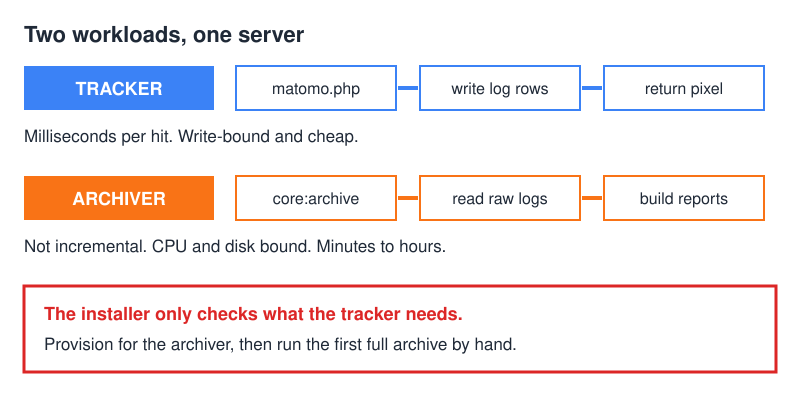
Matomo’s auto-archiving FAQ is honest about the cost. Archiving for today’s reports “is not incremental,” it says.
A run “completes in a few minutes when your site is new.” As data builds up, “it may take a couple dozen minutes,” and on the biggest sites it can take hours.
The same FAQ puts numbers on memory. “Sites with less data or fewer features enabled can use 512M or 2G,” while “8G is a common size for a medium to large Matomo instance.”
Two consequences follow. First, the worst moment of your Matomo life is the first archive after a bulk import.
Import eighteen months of server logs, and every day, week, month and year gets built in one pass. That’s exactly when a 2 GB box starts swapping.
Second, never let the browser trigger archiving on a live site. One dashboard load can start report processing inside a PHP-FPM worker with a web timeout.
Hand the job to cron instead:
[General]
browser_archiving_disabled_enforce = 1
Then add the hourly cron entry Matomo documents, calling console core:archive as the web user.
Here’s the habit I keep on every box: run that first full archive by hand, in a terminal, while watching top.
You learn your real archiving window in one evening. Otherwise you find out three weeks later, when reports quietly stop updating.
How much RAM, CPU and disk by traffic volume?
Matomo publishes hardware tiers by monthly pageviews. I’ve reproduced them below and added two columns the page leaves out.
| Monthly pageviews | Matomo’s published spec | CLI memory_limit |
What archiving feels like |
|---|---|---|---|
| Up to 100K | One server: 2 CPU, 2 GB RAM, 50 GB SSD | 768M, which Matomo applies itself | Minutes per run while history is short |
| Up to 1M | One server can be enough: 4 CPU, 8 GB RAM, 250 GB SSD | 768M holds. I move to 2G before the first full archive | Tens of minutes once a year of data has built up |
| Up to 10M | App: 8 CPU, 16 GB, 100 GB SSD (or two app servers with 4 CPU, 4 GB each). DB: 8 CPU, 16 GB, 400 GB SSD | 2G, heading toward 8G | Hours, so the cron window needs planning |
| Up to 100M | App: 2 or 3 servers with 16 CPU, 16+ GB, 100 GB SSD. DB: 16 CPU, 32 GB, 1 TB SSD, plus a load balancer and a CDN | 8G, Matomo’s “medium to large” figure | Continuous, so treat archiving as a service |
| Over 100M | At least 5 servers: 3 or more app servers, 2 database servers with one as a reader, a load balancer and a CDN | 8G and up | A cluster job. Matomo asks you to contact them |
The server column is Matomo’s, taken straight from the requirements page. The archiving column paraphrases the auto-archiving FAQ.
The memory column uses Matomo’s documented figures: the 768M archiving floor from its default config, 2G from the high-traffic page and 8G for bigger instances.
In practice I provision one tier above the table. The extra headroom costs a few dollars a month and covers the first full archive and the odd log import.
Matomo also recommends two servers, one for the database and one for everything else, once you track more than 1 million actions a month.
Disk is the number that keeps moving
Raw log rows are only half of your database. The matomo_archive_* tables grow alongside them.
They grow with every segment and custom report you define, because Matomo stores each one per period: day, week, month and year.
Define five segments and you haven’t added five rows. You’ve added five rows for every period Matomo archives, forever.
Measure growth after month one rather than trusting the tier table. Then use the lever that exists: Administration, then Privacy, where Matomo can purge old raw logs and old report data.
There’s a trap in it. Matomo’s FAQ warns that if old logs are deleted before reports are processed, “the data will be lost forever.”
So get cron archiving working and verified first. Only then switch on log purging. The other order destroys history that no backup brings back.
Which PHP extensions break the install?
The system check names them, but the error text isn’t always obvious. Swap 8.3 for your branch (php -v tells you).
- “Class ‘PDO’ not found,” or a red PDO row. The database driver is missing, the one hard stop. On Debian or Ubuntu,
sudo apt install php8.3-mysqlgives you bothpdo_mysqlandmysqli. - A red row for zlib, filter or session. These are required by the system check. Most PHP builds include them, so this usually means a stripped-down container image.
- Sparklines and graphs render as broken images. No GD. The install “worked” and every visual is dead. Run
sudo apt install php8.3-gd. - GeoIP downloads and one-click updates fail quietly. No cURL, and usually no error message either. Run
sudo apt install php8.3-curl. - Scheduled reports and XML exports throw DOM errors. Run
sudo apt install php8.3-xml, and addphp8.3-mbstringwhile you’re there. - Cron archiving does nothing while the web UI is fine. There’s often no CLI binary installed at all, only FPM. Run
sudo apt install php8.3-cli.
Then verify as the cron user: php -m | grep -E 'pdo_mysql|mbstring|curl|gd|xml'.
That last case catches people who did everything right in the browser. The CLI reads its own php.ini, with its own limits, and nobody thought to check it.
Shared hosting, VPS or managed?
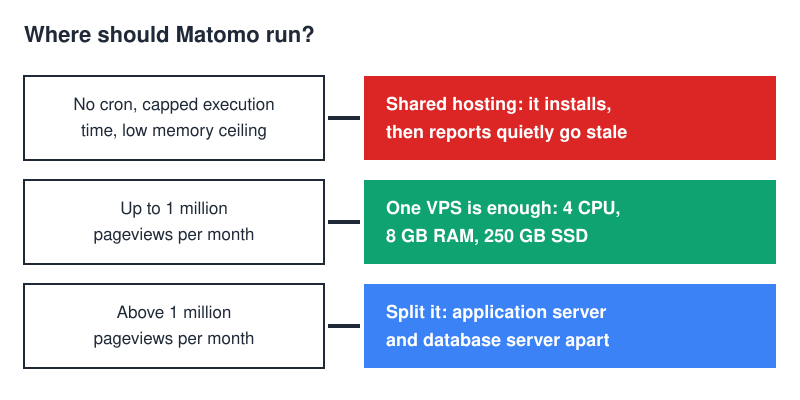
Matomo installs fine on decent shared hosting. It won’t archive reliably there, and archiving is the part that matters.
Three things break. Cron is missing or can’t call the PHP CLI with your own php.ini.
Execution time is capped and can’t be set to unlimited. And the host’s memory ceiling sits below the 768 MB Matomo wants for archiving.
A sane minimum VPS: 2 vCPU, 4 GB RAM, NVMe, root access and your own cron.
The extra 2 GB over Matomo’s line isn’t padding. It buys first-archive headroom and an InnoDB buffer pool that isn’t squeezed when the archiver starts.
Above roughly a million pageviews a month, Matomo moves to a split application and database pair. That changes how you deploy, back up and monitor, as covered in scaling self-hosted analytics.
Where self-hosting stops paying for itself
Below a certain size, the VPS bill plus your own maintenance time costs more than a hosted plan that patches itself.
The work is nearly the same at a thousand pageviews a month or a hundred thousand: the same upgrades, backups and broken cron at the worst moment.
And if nobody owns OS updates, Matomo upgrades and backups, self-hosting turns from a privacy win into a liability. The full trade-off is in self-hosted vs cloud analytics.
Pre-install checklist
php -v: 8.1 or newer for Matomo 6 (8.3+ is my pick), with the CLI version matching FPM.php -m | grep -E 'pdo_mysql|mbstring|curl|gd|xml': five lines back.mysql --version: MySQL 8.0+ or MariaDB 10.6+ for Matomo 6, with InnoDB as the default engine.df -handfree -m: disk against the tier table, and RAM with room for the buffer pool.memory_limitandmax_execution_timein the CLIphp.ini, not only the FPM one.max_allowed_packetandwait_timeoutinmy.cnf, with the database restarted afterwards.- Cron proven to run
php /path/to/matomo/console core:archiveas the web user. Proven, not assumed.
FAQ
What are the minimum Matomo system requirements?
For Matomo 6: PHP 8.1, MySQL 8.0 or MariaDB 10.6, and pdo_mysql or mysqli. For Matomo 5: PHP 8 and MySQL 5.5 or MariaDB. Under 100,000 pageviews a month, Matomo publishes 2 CPU, 2 GB RAM and 50 GB SSD.
How much RAM does Matomo need?
Matomo publishes 2 GB for up to 100,000 pageviews a month and 8 GB up to a million. I treat 4 GB as the production minimum, because archiving alone takes 768 MB.
Which PHP version does Matomo require?
PHP 8.1 or newer for Matomo 6, and PHP 8 for Matomo 5 per the requirements page. Run a branch that still gets security fixes, which today means PHP 8.2 or newer, ideally 8.3+.
Does Matomo 6 work with MySQL 5.7?
No. Matomo 6 needs MySQL 8.0 or newer, or MariaDB 10.6 or newer. Stay on Matomo 5 until the database is upgraded.
Will Matomo run on shared hosting?
It will install. It won’t reliably archive, because shared hosts cap execution time and memory and rarely give you a usable CLI cron.
The short version
Matomo 5 needs PHP 8 and MySQL 5.5 or MariaDB. Matomo 6 needs PHP 8.1 and MySQL 8.0 or MariaDB 10.6.
Read those lines as an installer checklist, not a capacity plan. Size the server for archiving, run the first full archive by hand, and turn on log purging only after archiving works.
The step-by-step build is in our Matomo self-hosted setup guide.