Cookie consent banners are everywhere. They interrupt the user experience, slow down websites, and—ironically—many visitors just click “reject all” anyway. The result? You lose data on a significant portion of your traffic.
There’s a better way. Cookie-free analytics lets you understand your website visitors without storing anything on their devices. No cookies means no consent banners, no compliance headaches, and no data gaps from rejected consent.
In this guide, I’ll explain how cookieless tracking actually works, why it matters for privacy and compliance, and which tools do it best.
What Are Cookies and Why Are They a Problem?
Cookies are small text files that websites store on your browser. In analytics, they’re typically used to:
- Identify returning visitors
- Track sessions across multiple pages
- Attribute conversions to traffic sources
- Build user profiles over time
The problem? Under GDPR, PECR, and similar privacy laws, storing cookies requires explicit user consent. That’s why you see cookie banners on almost every website.
However, consent rates are dropping. Studies show that 20-40% of visitors reject tracking cookies or simply ignore the banner. That’s a massive blind spot in your analytics data.
What Is Cookie-Free Analytics?
Cookie-free analytics (also called cookieless tracking) collects website data without storing any information on the visitor’s device. Instead of relying on persistent identifiers, these tools use alternative methods to count visitors and track behavior.
The key difference is simple:
| Aspect | Cookie-Based Analytics | Cookie-Free Analytics |
|---|---|---|
| Storage location | Visitor’s browser | Server-side only |
| Consent required | Yes (GDPR/PECR) | Usually no |
| Data persistence | Days to years | Session or daily |
| Cross-site tracking | Possible | Not possible |
| User identification | Persistent ID | Anonymized hash |
In other words, cookie-free analytics trades long-term individual tracking for privacy-respecting aggregate insights.
How Does Cookieless Tracking Work?
Privacy-first analytics tools use several techniques to identify unique visitors without cookies. Here’s how the most common methods work:
1. Hashing with Daily Salt
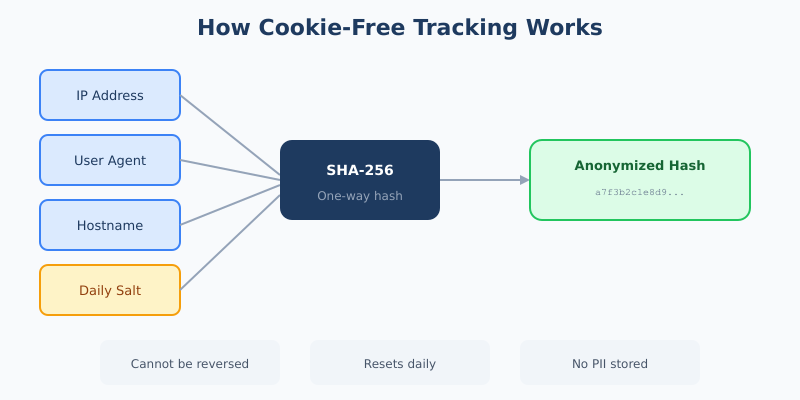
This is the most popular approach. The analytics tool combines several data points:
- IP address
- User Agent (browser and OS information)
- Website hostname
- A “salt” value that changes daily
These elements are processed through a one-way hash function (typically SHA-256). The result is an anonymized identifier that:
- Cannot be reversed to reveal the original data
- Is unique enough to count visitors accurately
- Resets daily, preventing long-term tracking
For example, Fathom Analytics and Plausible both use this technique.
2. Session-Based Counting
Some tools take an even simpler approach. They count pageviews and sessions without attempting to identify individual visitors at all. Each page load is an independent event.
This method is extremely privacy-friendly but provides less insight into user journeys and return visits.
3. Server-Side Processing
Instead of running JavaScript that accesses browser storage, cookieless tools process everything on the server. The visitor’s browser sends a simple request, and all identification logic happens server-side.
As a result, there’s nothing stored on the user’s device—ever.
Why Cookie-Free Analytics Matters
Switching to cookieless tracking isn’t just about compliance. There are real business benefits:
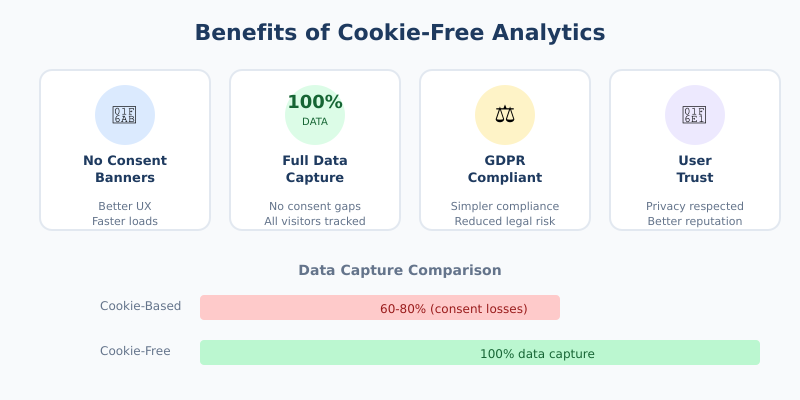
No Consent Banners Needed
If you’re not storing cookies or collecting personal data, you don’t need a cookie consent banner for analytics. This means:
- Cleaner user experience
- Faster page loads (no banner scripts)
- Higher engagement (no interruption)
- Better conversion rates
France’s data protection authority (CNIL) has confirmed that properly configured cookie-free analytics tools like Matomo are exempt from consent requirements.
100% Data Capture
With cookie-based analytics, you only see data from visitors who accept tracking. That’s often 60-80% of your actual traffic.
Cookie-free analytics captures everyone. No consent rejection means no data gaps.
Simplified Compliance
GDPR, CCPA, PECR—privacy regulations are complex. By choosing a tool that doesn’t process personal data, you significantly reduce your compliance burden:
- No Data Processing Agreements (DPAs) needed in most cases
- Simpler privacy policy
- Reduced legal risk
User Trust
Privacy-conscious visitors appreciate websites that respect their data. In fact, displaying a “no cookies” message can be a trust signal that improves brand perception.
Cookie-Free Analytics Tools Compared
Several privacy-first analytics platforms offer cookieless tracking. Here’s how they compare:
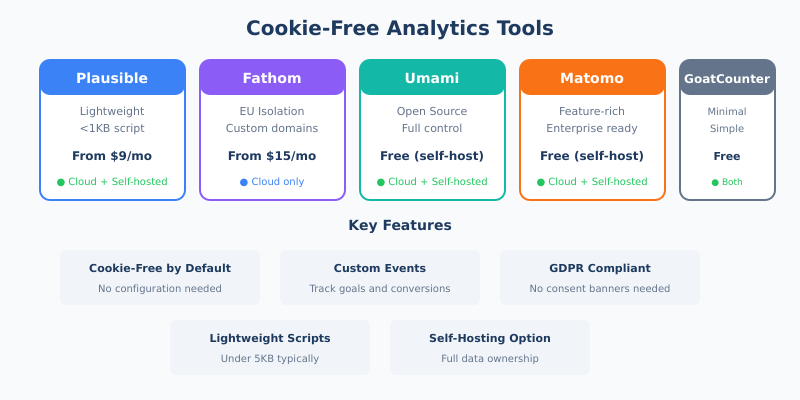
| Tool | Hosting | Starting Price | Cookie-Free | Best For |
|---|---|---|---|---|
| Plausible | Cloud / Self-hosted | $9/month | Yes | Simplicity, lightweight script |
| Fathom | Cloud only | $15/month | Yes | EU isolation, custom domains |
| Umami | Self-hosted / Cloud | Free (self-hosted) | Yes | Developers, full control |
| Matomo | Cloud / Self-hosted | Free (self-hosted) | Configurable | Advanced features, enterprise |
| GoatCounter | Cloud / Self-hosted | Free (limited) | Yes | Minimalists, budget-conscious |
| Simple Analytics | Cloud only | $9/month | Yes | EU hosting, simplicity |
For a detailed comparison, see my Matomo vs Plausible vs Fathom analysis.
Which Tool Should You Choose?
Your choice depends on your priorities:
- Maximum simplicity: Plausible or Simple Analytics
- Self-hosting required: Umami or Matomo
- Advanced features: Matomo (with cookieless mode enabled)
- Minimal footprint: GoatCounter
- EU data residency: Fathom (EU isolation) or Simple Analytics
What You Lose Without Cookies
Cookie-free analytics isn’t magic. There are trade-offs you should understand:
Limited Cross-Session Tracking
Without persistent cookies, you can’t reliably track the same user across multiple sessions over weeks or months. Daily hash rotation means a visitor on Monday looks like a different visitor on Tuesday.
For most websites, this is acceptable. You still get accurate daily and weekly metrics.
No Long-Term Cohort Analysis
Building detailed customer cohorts over 30, 60, or 90 days becomes difficult. If you need to track individual user journeys over extended periods, you may need authenticated tracking (where users log in).
Approximate Unique Visitor Counts
Hash-based identification is accurate but not perfect. In some edge cases (users with identical IP/User Agent combinations), counts may be slightly off. In practice, the difference is typically under 5%.
Implementing Cookie-Free Analytics
Setting up cookieless tracking is straightforward. Here’s a typical process:
Step 1: Choose Your Tool
Select a privacy-first analytics platform based on your needs. Consider hosting preferences, budget, and required features.
Step 2: Add the Tracking Script
Most tools provide a single JavaScript snippet. For example, Plausible’s script is under 1KB:
<script defer data-domain="yourdomain.com" src="https://plausible.io/js/script.js"></script>That’s it. No cookie consent configuration needed.
Step 3: Configure Privacy Settings
If you’re using Matomo, you’ll need to enable cookieless mode explicitly:
- Go to Administration → Privacy → Anonymize data
- Enable “Use cookies” = No
- Configure IP anonymization
- Set appropriate data retention periods
For detailed GDPR configuration, check my guide to privacy compliance in analytics tools.
Step 4: Remove Cookie Banners (Optional)
If analytics was your only reason for showing a cookie banner, you can now remove it. However, check if other tools on your site (chat widgets, marketing pixels) still require consent.
Step 5: Update Your Privacy Policy
Even without cookies, you should document your analytics practices. A simple statement like this works:
“We use [Tool Name] for website analytics. This tool does not use cookies and does not collect personal data. All data is anonymized and aggregated.”
Cookie-Free Analytics and GDPR
A common question: do you really not need consent?
The answer depends on implementation. Under GDPR, consent is required when you:
- Store data on the user’s device (cookies, local storage)
- Process personal data (IP addresses, unique identifiers)
Properly configured cookie-free analytics tools avoid both. They:
- Store nothing on the device
- Hash and anonymize all data immediately
- Never create reversible identifiers
Therefore, most privacy-first tools qualify for the “strictly necessary” or “legitimate interest” exemptions. The French CNIL and other authorities have confirmed this for tools like Matomo when properly configured.
That said, I recommend documenting your compliance reasoning and consulting with a legal professional if you have concerns.
Common Misconceptions
“Cookie-free means no useful data”
False. You still get pageviews, sessions, traffic sources, device types, geographic data at country or region level, and conversion tracking. For most websites, that’s everything you need.
“It’s only for small websites”
Also false. Major companies use privacy-first analytics. The approach scales perfectly—it’s just a different philosophy about what data you collect.
“You can’t track conversions”
Incorrect. Tools like Plausible and Fathom support custom events. You can track form submissions, button clicks, purchases, and other goals without cookies.
Is Cookie-Free Analytics Right for You?
Cookie-free analytics is ideal if:
- You want to simplify GDPR/PECR compliance
- You’re tired of cookie banner friction
- You value user privacy
- You need accurate traffic data without consent gaps
- Aggregate insights (not individual tracking) meet your needs
It may not be right if:
- You need detailed individual user journeys over months
- You require integration with advertising platforms that depend on cookies
- Your business model requires persistent user identification
Bottom Line
Cookie-free analytics offers a practical way to understand your website traffic while respecting user privacy. By using techniques like hashed identifiers and server-side processing, these tools provide accurate metrics without consent banners or compliance headaches.
The trade-off—limited long-term individual tracking—is acceptable for most websites. In return, you get 100% data capture, cleaner UX, and genuine privacy compliance.
Tools like Plausible, Fathom, Umami, and Matomo make implementation straightforward. Most setups take under 10 minutes.
If you’re still using cookie-based analytics and struggling with consent rates, it’s worth trying a privacy-first alternative. Your data accuracy—and your users—will thank you.