Your analytics tool knows which country your visitors come from. If it is also storing IP addresses to work that out, you are holding personal data you don’t need and carrying legal risk you could drop tomorrow.
Privacy-friendly geolocation is the fix: derive country and region from the IP address with a local GeoIP database, then throw the address away. The lookup runs in memory, in microseconds, and what lands in your tables is DE or Bavaria, never 85.214.0.1. What follows is the mechanics — which free GeoIP databases you can put on disk (GeoLite2, DB-IP Lite, IP2Location LITE, IPinfo Lite), how to read one without calling anyone’s API, and where accuracy runs out. City-level geo from free data is a deliberate trade-off, not a bug you can configure away.
Why IP Addresses Are Personal Data Under GDPR
This is not a gray area. Supervisory authorities across the EU treat IP addresses as personal data whenever a controller can reasonably link them to a person, and in web analytics the controller usually can.
The CJEU ruling in Breyer v. Germany (C-582/14) settled the dynamic-IP question: an address is personal data for an operator who has legal means to identify the person behind it, even indirectly through the ISP. Write the raw IP anywhere, even to a weekly-rotating log, and you owe it a legal basis, a defensible retention period and a line in your privacy policy. IP geolocation for GDPR compliance works the other way round: use the address once, keep nothing.
Do the lookup server-side, record the result (country=DE, region=Bavaria), discard the address before it reaches anything persistent. Country and region describe a population, not a person.
How Local GeoIP Databases Work
A GeoIP database is a prebuilt map from IP ranges to locations. Each network block (2.21.92.0/29, 2001:4b0::/64) carries a country, sometimes region and city, sometimes an autonomous system number; a lookup finds the block containing the address and returns what is attached. No external request, no third party seeing your visitors, no latency worth measuring.
The binary format nearly everyone uses is MMDB (MaxMind DB), a memory-mapped tree with readers in every mainstream language; providers also publish CSV for loading ranges into Postgres or MySQL. On a small VPS I ran 100,000 lookups against a country-level MMDB from Python in 0.19 seconds — the per-request cost is a rounding error.
Both halves of the privacy argument live here: the sensitive computation happens on hardware you control, and only the harmless output joins your visitor data. A self-hosted analytics stack gets this for free — the database file sits next to the application.

Free GeoIP Databases Compared: GeoLite2, DB-IP Lite, IP2Location LITE, IPinfo Lite
Four free databases cover almost every self-hosted deployment. They differ less in what they return than in license terms, whether you need an account, and how often a fresh file appears. Everything below comes from the providers’ own pages; terms move, so re-check before you commit.
| Database | Editions | License / attribution | Account needed | Formats | Update cadence |
|---|---|---|---|---|---|
| MaxMind GeoLite2 | Country · City · ASN | GeoLite EULA (CC BY-SA 4.0 core); attribution; delete old copies within 30 days of a new release | Yes — account + license key | MMDB, CSV | Country, City: Tuesday and Friday · ASN: every weekday |
| DB-IP Lite | Country · City · ASN | CC BY 4.0; link back to db-ip.com on pages that show results | No — direct download | MMDB, CSV | Monthly |
| IP2Location LITE | DB1 (country) to DB11 (country, region, city, coordinates, ZIP, time zone); IP2Proxy LITE | Own LITE license; personal or commercial use with attribution; no third-party mirrors | Yes — free account, e-mail verification | BIN, CSV, MMDB | First day of each month |
| IPinfo Lite | Country + continent + ASN (7 fields) | CC BY-SA 4.0; attribution by link | Yes — token for API and downloads | MMDB, CSV, JSON, Parquet | Daily |
MaxMind GeoLite2 free geolocation data is the reference most tools are written against, and the one with strings attached. Its GeoLite End User License Agreement puts the copyrightable parts under CC BY-SA 4.0, then adds what a plain CC license lacks: delete superseded databases within 30 days of a newer release, no more than 30 downloads per account per day. MaxMind’s own docs call the free GeoLite City data “considerably less accurate” than paid GeoIP City and “not recommended for commercial use cases”. For analytics you want the Country file — the GeoIP country database most tools default to, a few megabytes that answer “which country” for almost any public address.
DB-IP Lite is the least friction of the four: no account, direct download, plain Creative Commons Attribution 4.0. The August 2026 Country Lite MMDB I pulled while writing this was about 8 MB, built on 1 August, and its record layout (continent.code, country.iso_code, country.is_in_european_union) matches GeoLite2 closely enough that the same reader code works unchanged. The attribution clause is explicit: a web application that shows results must link back to db-ip.com.
IP2Location LITE goes deepest on fields — DB1 is country only, DB11 adds region, city, coordinates, ZIP and time zone — plus the separate IP2Proxy LITE series. The catch is packaging and terms: their own BIN format everywhere, MMDB only for the country edition, and a license that forbids third-party mirrors. If you already run their SDKs, fine; otherwise MMDB from one of the other three is less work.
IPinfo Lite is the newest and the only free one rebuilt daily. Country level only — seven fields: asn, as_name, as_domain, country_code, country, continent_code, continent. City data and privacy detection are paid. For a country report, country plus ASN is the shape you need.
Which one should you pick?
Strictly, open source geolocation means the readers rather than the data: libmaxminddb and the language bindings are open source, the databases are free on the provider’s terms. For a country report, take whatever IP geo database your tool bundles and keep it fresh — all four agree on country for the overwhelming majority of addresses. GeoLite2 if your software is hard-wired to it or you want ASN and City from one account; DB-IP Lite for no account and CC BY; IPinfo Lite for daily freshness; IP2Location LITE if you already live in their ecosystem. None fits a decision that hinges on city precision.
What Replaced freegeoip? Offline Lookups
Searches for a freegeoip alternative still reach this site every month, years after the service went away. freegeoip.net was a free HTTP API: send an IP, get JSON with country, region and city. Its maintainers announced the deprecation on 31 March 2018 and shut the legacy endpoint down that July, relaunching as ipstack behind an access key. The repository is archived, and the old freegeoip.net host answers 403 Forbidden.
The lesson is not “find another free endpoint”. Every hosted geolocation API transmits visitors’ addresses to a third party on every page view — a transfer you must justify, contract for and disclose — and leaves you exposed to the same shutdown that punished freegeoip users. The replacement that does not expire is a local database read in-process: no key, no quota, no outbound request.
Looking Up a Country From an IP Without an API
You need an MMDB file on disk and a reader. On the command line that is mmdblookup from MaxMind’s libmaxminddb (Apache-2.0), packaged as mmdb-bin on Debian and Ubuntu. It reads GeoLite2, DB-IP and any other spec-compliant MMDB alike:
$ mmdblookup --file /usr/share/GeoIP/GeoLite2-Country.mmdb --ip 81.2.69.142 country iso_code

  "GB" <utf8_string>

$ mmdblookup --file dbip-country-lite-2026-08.mmdb --ip 81.2.69.142 country is_in_european_union

  false <boolean>
The trailing arguments are a path into the record, so you print only the field you need. Add --verbose and mmdblookup prints the database metadata — which is how I noticed that the GeoLite2 file on one of my older servers was built in December 2019 and still answered is_in_european_union: true for a British address. The August 2026 DB-IP file says false. A stale geolocation database does not crash; it quietly reports a world that no longer exists.
You may also meet geoiplookup, from the older GeoIP C library (geoip-bin). It reads the legacy .dat format that MaxMind no longer ships GeoLite in, so on a fresh system it finds nothing or a fossil. Use mmdblookup; for JSON output, MaxMind’s Go tool mmdbinspect.
In application code the pattern is identical everywhere: open the file once at startup, call get(ip) per request, keep the country code, drop the address. Python, with the maxminddb reader:
import maxminddb

reader = maxminddb.open_database("/opt/geoip/GeoLite2-Country.mmdb")   # once, at startup

def country_for(ip: str) -> str:
    rec = reader.get(ip)
    return rec["country"]["iso_code"] if rec and "country" in rec else "XX"
PHP, with maxmind-db/reader from Composer (the optional php-maxminddb extension makes it faster):
use MaxMind\Db\Reader;

$reader  = new Reader('/opt/geoip/dbip-country-lite.mmdb');
$record  = $reader->get($_SERVER['REMOTE_ADDR']);
$country = $record['country']['iso_code'] ?? 'XX';
$reader->close();
Node.js follows in the pipeline section, where Express middleware is its natural home. A network-keyed filter like the one in our piece on bot traffic detection in privacy-first analytics can share the same open handle.
IP Anonymization and Truncation Before Storage
Even with the lookup local, the address still passes through your application on the way to the geolocation function. How you treat it in that moment matters.
The simplest approach is IP truncation: zero the last octet for IPv4, the last 80 bits for IPv6, before the value touches anything persistent. The result still supports rough geo but no longer points at a single device. Keeping nothing is better; truncation is for the debugging column or short-lived abuse log that must exist.
import ipaddress

def anonymize_ip(ip: str) -> str:
    bits = 24 if ipaddress.ip_address(ip).version == 4 else 48
    return str(ipaddress.ip_network(f"{ip}/{bits}", strict=False).network_address)

country = country_for(raw_ip)      # full address in, country code out
anon    = anonymize_ip(raw_ip)     # 203.0.113.195 → 203.0.113.0, only if you must keep something
del raw_ip                         # the full address goes no further
What lands in your warehouse is anonymized location data — a country code, sometimes a region, nothing that points back at a device. Order matters, though: look up with the full address first, then truncate or discard. Truncating before the lookup costs accuracy for no privacy gain, because the lookup itself stores nothing. Matomo’s IP masking works this way, with a separate switch for whether the masked or full address feeds geolocation.
The Full Server-Side Lookup Pipeline
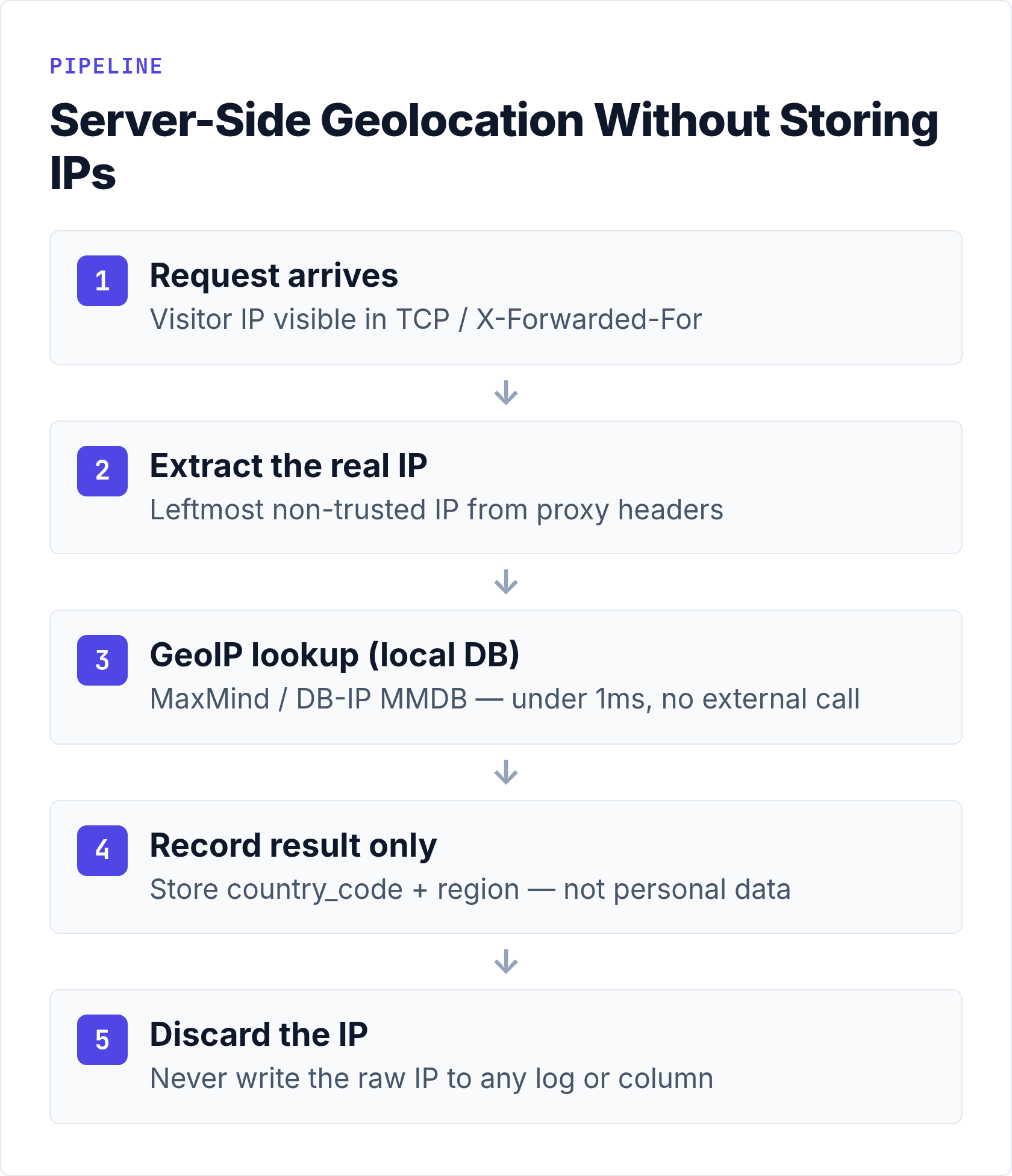
The address arrives in the TCP connection or, behind a proxy or CDN, in X-Forwarded-For; you work out which entry there is really the client, run one get() against the local database, write country_code and optionally region, and let the address go out of scope. Only that second step is easy to get wrong — trust the header blindly and every visitor geolocates to your load balancer. For Node.js and Express with the maxmind npm package:
import maxmind from "maxmind";

const lookup = await maxmind.open("/opt/geoip/GeoLite2-Country.mmdb");   // load once, not per request

app.use((req, res, next) => {
  const rawIp = req.ip;                                  // trust-proxy configured correctly
  const geo = lookup.get(rawIp);
  req.geoCountry   = geo?.country?.iso_code ?? "XX";     // "DE", "PL", "US"
  req.geoContinent = geo?.continent?.code ?? "??";
  next();                                                // rawIp is never passed further
});
Opening the database once at process start matters — MMDB files are memory-mapped, repeated opens are waste. Trust-proxy settings matter more; a pipeline that geolocates the CDN edge is worse than none, because the numbers look plausible. If you run Plausible, Umami, Matomo or GoatCounter you write none of this; what differs is which database ships in the box and how it stays current.
Anonymous-IP and Privacy Detection Databases: VPN, Proxy, Tor, Hosting
A second family of databases answers a different question: not where an address is but what kind of address it is. An anonymous IP database (MaxMind’s term) or privacy detection database (IPinfo’s) flags ranges belonging to VPN providers, public proxies, Tor exit nodes, hosting and data-center networks, and relays such as Apple’s Private Relay. They exist for fraud teams, but analytics borrows them: scraper traffic comes overwhelmingly from hosting ranges, and geolocating an anonymized address is fiction — a VPN exit in Frankfurt says nothing about the visitor. The privacy logic is unchanged: look up the flags, keep the boolean, drop the IP.
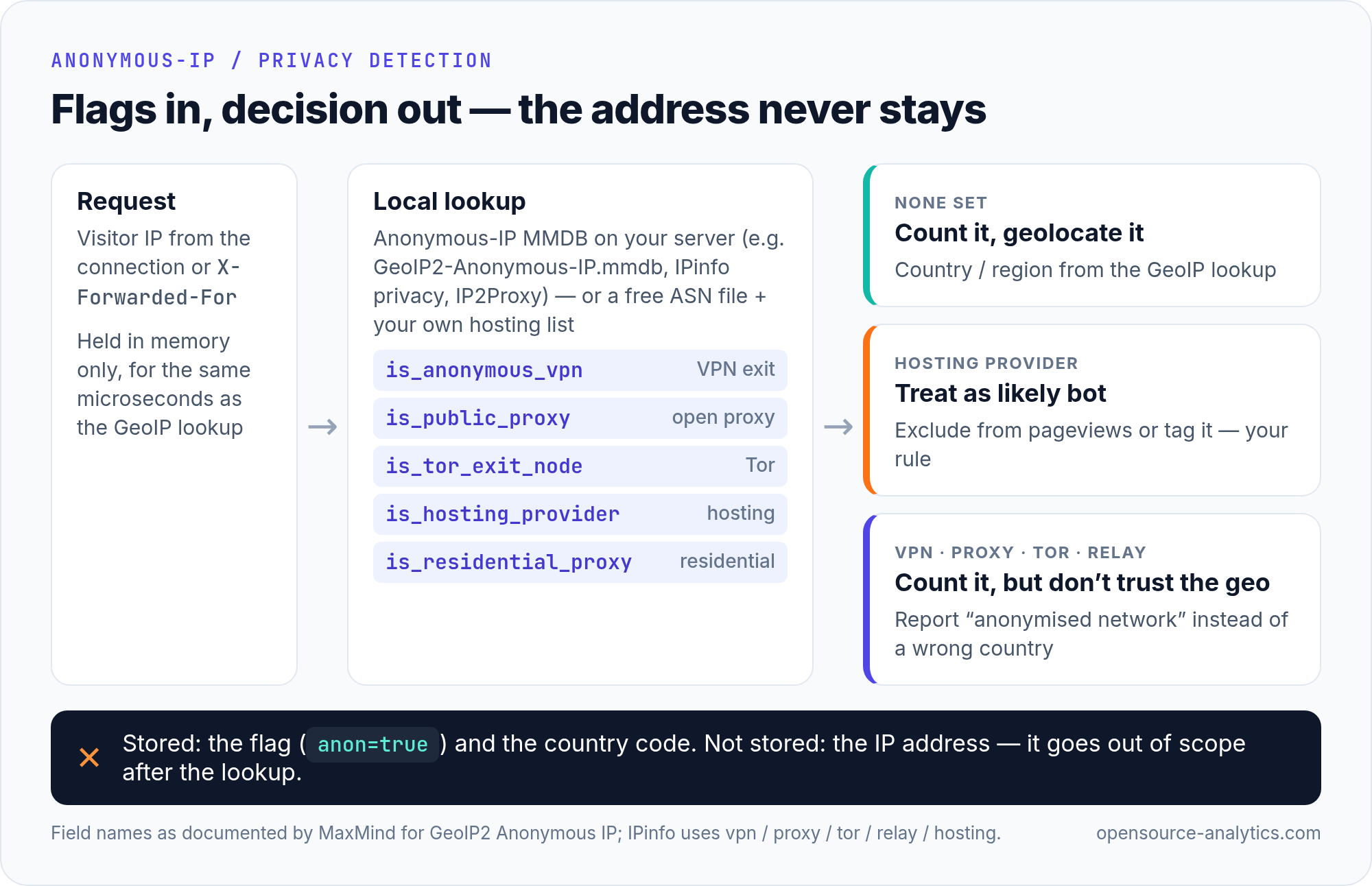
MaxMind GeoIP2 Anonymous IP is what you will see in configs as GeoIP2-Anonymous-IP.mmdb: commercial, sold through MaxMind’s enterprise team, updated daily, six boolean fields per network — is_anonymous, is_anonymous_vpn, is_hosting_provider, is_public_proxy, is_tor_exit_node, is_residential_proxy. There is no GeoLite equivalent.
IPinfo Privacy Detection returns vpn, proxy, tor, relay, hosting and a service name (their sample response reads "Apple Private Relay"), as an API or a daily download. Paid, with a trial; the free IPinfo Lite file does not carry these fields. The one free option is IP2Proxy LITE, narrow on purpose: its files list open public proxies (type PUB) only, with VPN, Tor, data-center and residential-proxy ranges kept for the commercial edition.
The do-it-yourself route is usually enough for analytics: take a free ASN edition — GeoLite2-ASN, DB-IP ASN Lite or the ASN fields in IPinfo Lite — and keep a short list of hosting and cloud autonomous systems to exclude. It misses residential proxies and some VPNs, but it strips most data-center noise for nothing. Write the flag, not the address.
How Accurate Is City-Level GeoIP? Be Honest About the Trade-Off
City-level geolocation from free databases is not reliable enough to make decisions on. Country is where the data quality is strong, region is usable, and city is an estimate with a wide error bar — MaxMind publishes the numbers that prove it.
Their accuracy comparison tool measures how often an address resolves within a chosen radius of its true location. When I checked in August 2026: Germany at 50 km, free GeoLite City correct 64% of the time, wrong 33%, unresolvable 3% (paid GeoIP City: 69%). Poland at 50 km: 49% correct, 38% wrong, 12% unresolvable; at 10 km Poland drops to 32% correct against 55% wrong. United States at 50 km: 56%. United Kingdom: 60%. MaxMind’s own measurements of their own free product.
The structural reasons do not go away with a better file. ISPs allocate blocks regionally, not per town; mobile carriers route whole provinces through a few gateways; IPv6 delegations are large and loosely registered. MaxMind documents the consequence rather than hiding it. Every City record ships an accuracy_radius, “the radius in kilometers around the specified location where the IP address is likely to be”, and the knowledge base puts the working range at “5 km to hundreds of km”, warning integrators not to “assume that the IP address is located at or near the center of this geographic area”. Nor are the coordinates a guess at a street: “Locations are often near the center of the population”. And where an address cannot be pinned down the granular fields come back empty rather than approximated, because “not all IP addresses can be geolocated with enough specificity” to name a subdivision or city. A dashboard that draws an empty city as a real one is inventing data.
The trade-off is real: no stored IPs means no reverse DNS, no cross-session IP analysis, no triangulation. What you get back is country with high confidence, region with moderate, city with low. For a content site that is a fine bargain — “mostly DACH, some Benelux” is actionable. If your decision hinges on Munich versus Nuremberg, you need consent for precise location, not a bigger database; the EDPB guidance on consent is clear on collecting only what you have a basis for.
How Privacy-First Tools Implement This in Practice
The tools you are likely to run already do lookup-then-discard. What differs is which database is in the box and how it is refreshed; the details below come from each project’s documentation.
Plausible derives country, region and city from the IP and never stores the address; per its data policy the visitor identifier is hash(daily_salt + website_domain + ip_address + user_agent), with the salt rotated and deleted every 24 hours. Community Edition ships a DB-IP country database in the container image (IP_GEOLOCATION_DB defaults to dbip-country.mmdb.gz); set MAXMIND_LICENSE_KEY and it downloads GeoLite2 instead (MAXMIND_EDITION defaults to GeoLite2-City). Our Plausible CE deployment guide covers the environment file where those variables live.
Umami records country of origin and states that no personally identifiable information is stored. GEO_DATABASE_URL points at any MaxMind-compatible MMDB for when CDN headers are absent; SKIP_LOCATION_HEADERS forces the local database even when Cloudflare’s CF-IPCountry is present. Session identifiers use a rotating salt, monthly by default (SALT_ROTATION) — the same whether you run it bare or via the Umami Docker setup.
Matomo has the most knobs. IP masking is on by default at 2 bytes (192.168.xxx.xxx), adjustable to 1 or 3 bytes or full removal, and a separate setting decides whether geolocation reads the masked or the full address — Matomo recommends the masked one, at some cost in accuracy. The Geolocation admin page carries a downloader for the free DB-IP City Lite file and an auto-updater; a MaxMind license key swaps in GeoLite2. Operators mostly switch on masking and leave the rest at defaults. The Matomo self-hosted setup guide covers the exact settings.
GoatCounter ships a countries MMDB built in. The -geodb flag takes a path to a Country or City file (regions only with City) or a maxmind:account_id:license string, in which case it downloads a Cities database itself and refreshes it weekly on restart. Only the location is kept; IP and User-Agent are not.
The cookieless model these tools share — why a daily hash is not a cookie, and what you lose without one — is in our explainer on cookie-free analytics and why it matters.
Keeping GeoIP Databases Up to Date
GeoIP data goes stale; the 2019 file answering Brexit-era questions above is the proof. Every provider publishes a cadence, and your job is a cron job:
- GeoLite2 — Country and City every Tuesday and Friday, ASN every weekday, per MaxMind’s release schedule. The
geoipupdateclient (Apache-2.0 or MIT, at your option; packaged on Debian and Ubuntu) reads your account ID and key and fetches the editions you list. Remember the EULA clause: delete superseded copies within 30 days. - DB-IP Lite — monthly, with a predictable filename (
dbip-country-lite-YYYY-MM.mmdb.gz): a one-linecurlin a monthly cron. - IP2Location LITE — first of the month;
wgetorcurlwith your account token, and they e-mail you when a file is ready. - IPinfo Lite — daily; fetch nightly if you want that freshness, weekly if you do not.
Reload without restarting the whole application where you can, and alert on the build epoch in the MMDB metadata — older than a month means something broke. Plausible CE with a MaxMind key, Matomo’s auto-updater and GoatCounter’s maxmind: mode handle this; a bare Umami or a custom pipeline needs the cron.
Frequently Asked Questions
Is an IP address personal data under GDPR?
Yes, for practically every website operator. Since Breyer (C-582/14) even a dynamic IP is personal data when the operator has lawful means to identify the person, and supervisory authorities apply that reading to analytics logs. The clean way out is not storing the address: look up country and region locally, keep those, discard the IP.
Which free GeoIP database is the most accurate?
At country level the four agree on the overwhelming majority of addresses, and nobody publishes a head-to-head comparison worth trusting. Differences show up at city level, where MaxMind’s own tool puts its free City data at roughly half to two-thirds correct within 50 km. If city matters, test against addresses you know.
What replaced freegeoip?
Commercially, ipstack — the same team relaunched the service behind an API key in 2018 and archived the open-source repository. Technically, the better replacement is no API at all: a local MMDB from GeoLite2, DB-IP Lite, IP2Location LITE or IPinfo Lite, read in-process.
How do I look up a country from an IP without an API?
Download a country-level MMDB, then run mmdblookup --file db.mmdb --ip 1.2.3.4 country iso_code on the command line, or open the file with a reader library (maxminddb for Python, maxmind-db/reader for PHP, maxmind for Node.js) and call get(ip). Open once, query per request, keep the country code only.
What is an anonymous IP database, and does analytics need one?
A database that classifies addresses as VPN, public proxy, Tor exit, hosting or residential proxy — MaxMind GeoIP2 Anonymous IP and IPinfo Privacy Detection commercially, IP2Proxy LITE free for open proxies only. Most deployments do not need one: a free ASN file plus a hosting-ASN exclusion list removes the bulk of data-center noise. Store the flag, never the address.
What is ip2nation?
A free MySQL table mapping IP ranges to countries, built from registry data (ARIN, APNIC, RIPE). Its own site showed a last update of April 2022 when I checked, which rules it out for anything current; the four databases above are maintained and cover IPv6.
Does IP-based geolocation require consent?
Country or region derived on your own server and stored without the IP involves no persistent identifier and no device storage, which is why tools built this way run without a cookie banner. Precise location used to profile an individual is different processing and usually does need consent. Keep the two apart in your records.
If you take one action from this page, make it a check on the database file your analytics tool is actually reading: print its build date, compare it with the provider’s cadence, put the refresh on a schedule. Country data that is right, collected without a single stored address, beats city data that is wrong.