Most website owners reach for an analytics tool and immediately worry about cookie banners, GDPR compliance, and data breaches. GoatCounter solves all three in one move — and it does it with a script that weighs less than 4 KB. If you run a blog, a documentation site, a small SaaS, or any project where you need honest traffic numbers without the privacy headache, this goatcounter review is for you.
I’ve been running GoatCounter on a few of my own projects for over a year. What follows is my honest take: what it does well, where it falls short, and exactly who should use it.
What Is GoatCounter?
GoatCounter is an open-source, privacy-respecting web analytics tool built and maintained by Martin Tournoij (GitHub handle: arp242). It launched as a single-developer passion project and has stayed exactly that — which is both its biggest strength and the thing you need to understand before choosing it.
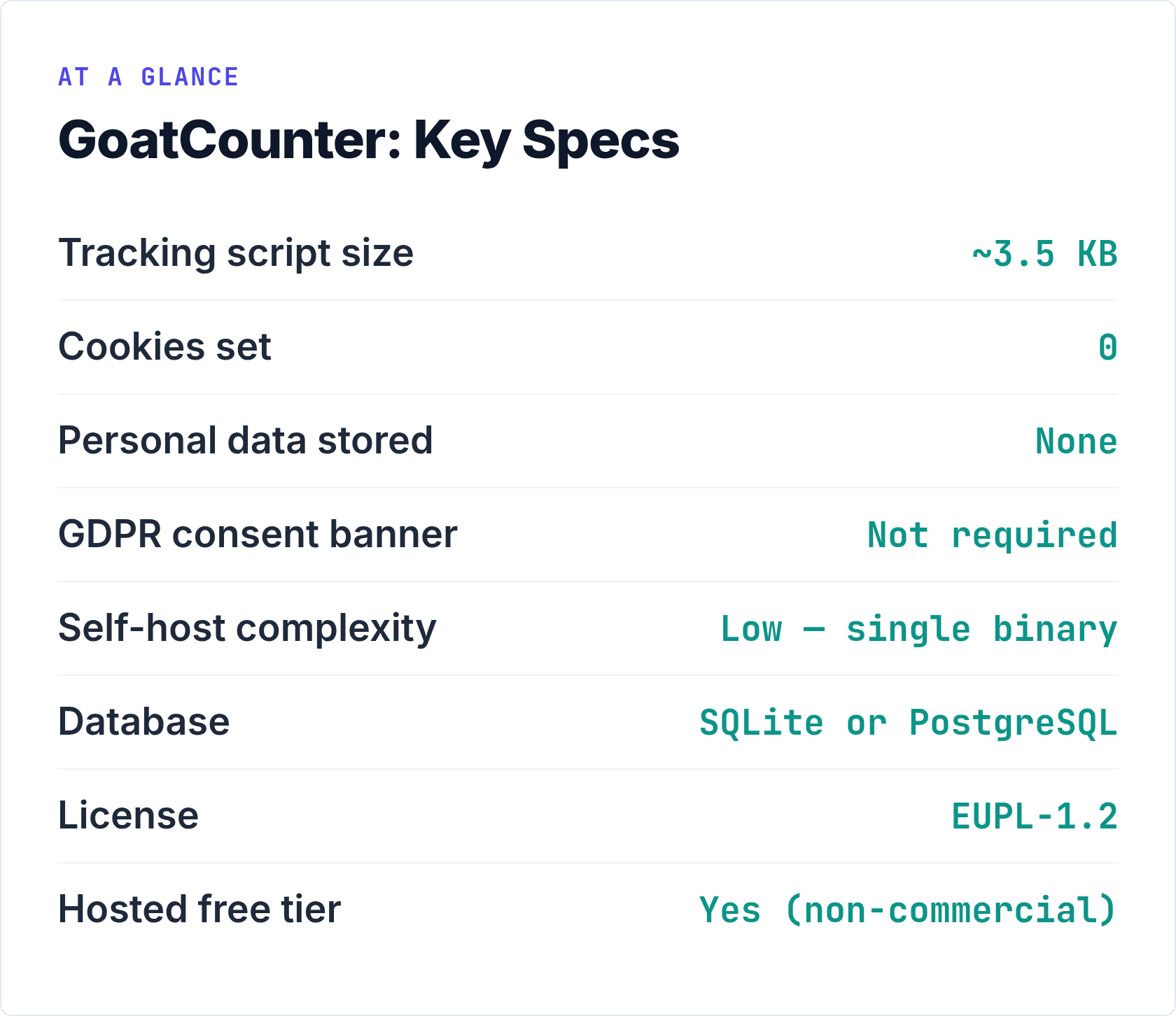
The tool is licensed under the EUPL-1.2, a copyleft license accepted across EU member states. The source lives on GitHub and you can inspect every line. As I always say: if you can’t inspect the code, it’s not really yours.
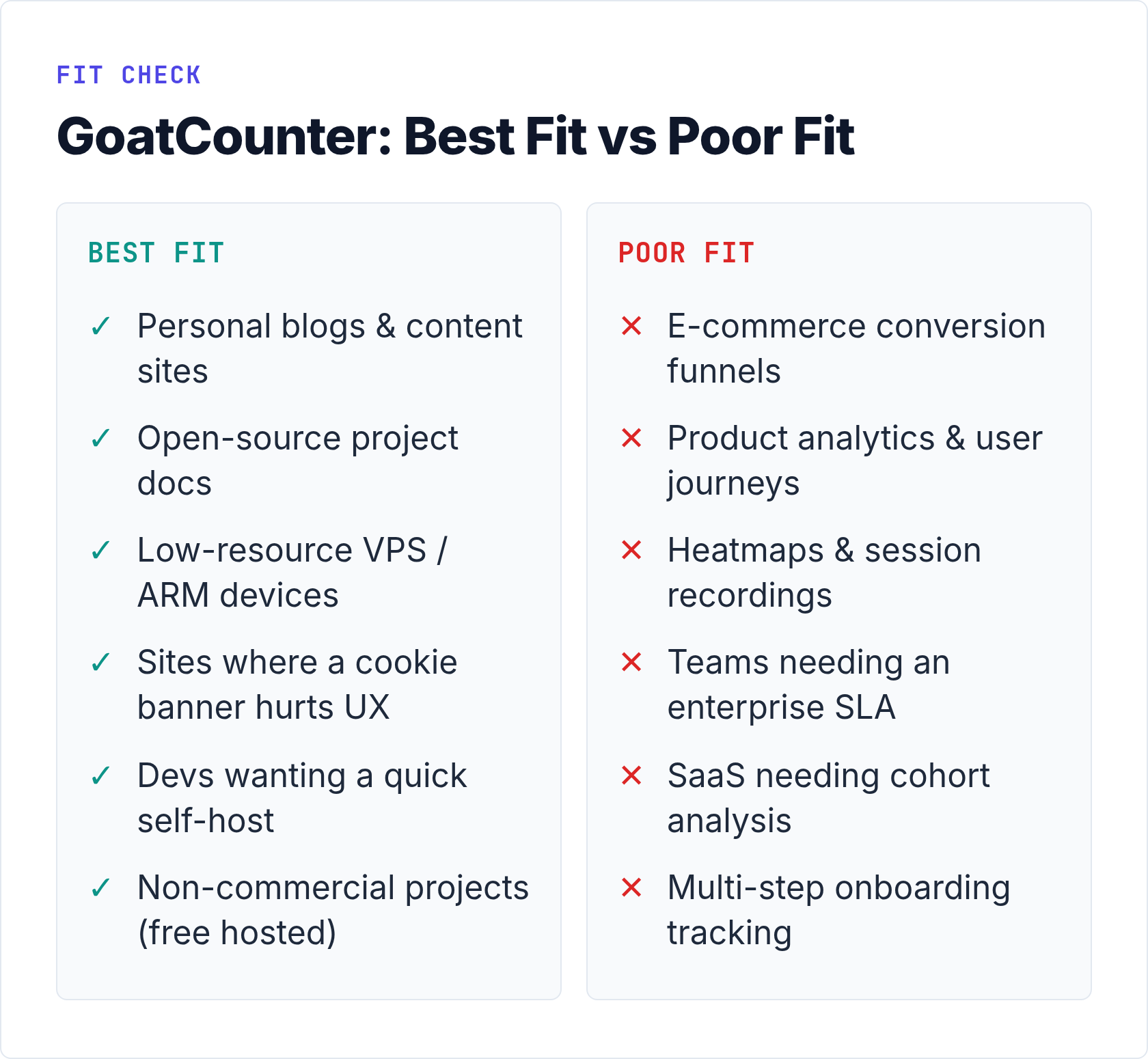
GoatCounter tracks pageviews, referrers, browsers, operating systems, screen sizes, and countries. That’s essentially it. There are no funnels, no heatmaps, no session recordings. It’s a counter — a very good one — not a full analytics suite.
For context on where it sits relative to heavier tools, see our Matomo vs Plausible vs Fathom comparison. GoatCounter is a step below all three in features, but also a step below in complexity and infrastructure cost.
Key Features Worth Knowing
No Cookies, No Consent Banner Required
GoatCounter does not use cookies. It doesn’t track unique users across sessions or store any personal data. The approach is session-based: it identifies a “visit” using a hash derived from the IP address, User-Agent, and a daily salt — but it never stores the raw IP. Because no personal data is collected and no persistent identifiers are set, you don’t need a GDPR consent notice. The EDPB guidelines on connected devices are clear that analytics requiring no personal data fall outside the consent requirement of the ePrivacy Directive.
That removes an entire layer of friction from your site. No cookie banner, no consent management platform, no JavaScript blocking your Core Web Vitals score.
A ~3.5 KB Tracking Script
When I tested the GoatCounter script against the tracking scripts of several mainstream analytics tools, the size difference was stark. GoatCounter’s tracking snippet comes in at roughly 3.5 KB. For comparison, most enterprise analytics tags run 10–30 KB or more — before you add tag manager overhead. On a slow mobile connection that difference is measurable in milliseconds.
Additionally, GoatCounter offers a JavaScript-free tracking pixel option. You can also integrate it server-side via middleware or import your existing web server log files directly. That last option means you can get historical traffic data from logs you already have, which is genuinely useful when migrating from another tool.
Simple, Honest Dashboard
The GoatCounter dashboard shows one screen of information: pageview counts per path, referrers, browsers, operating systems, screen sizes, and locations. Everything updates in near-real time. There are no secondary dashboards to navigate, no report builder, no custom dimensions.
When I first logged in, I had a full picture of my site traffic within 30 seconds. For most blog and small-site use cases, that’s all you need. For understanding what cookie-free tracking actually captures and what it misses, see our guide on cookie-free analytics and why it matters.
Multiple Sites on One Installation
A single GoatCounter installation can track multiple domains. You add each site as a separate “code” in the admin panel, and each gets its own dashboard and tracking snippet. This makes it practical for agencies or developers managing several small properties from one server.
Getting Started: Self-Hosting GoatCounter
Self-hosting GoatCounter is one of the simpler deployments in the privacy analytics space. The reason is straightforward: it ships as a single compiled Go binary. There is no PHP runtime to configure, no Node.js dependencies to manage, and no Docker required (though you can containerize it if you prefer).
Here’s the general path to a working installation:
- Download the binary for your platform from the official GoatCounter installation docs. Linux amd64 is the most common target for VPS deployments.
- Choose your database. GoatCounter supports SQLite (the default, excellent for low-traffic sites) or PostgreSQL for higher traffic or multi-site setups. SQLite means zero database administration for most users.
- Run the binary. A single command starts the server:
goatcounter serve -listen :8080 -db sqlite3://db.sqlite3 - Proxy with Nginx. Put Nginx in front, handle TLS termination with Certbot, and proxy requests to GoatCounter’s local port. This is the same pattern covered in our complete self-hosted analytics guide.
- Add the snippet. Copy the two-line tracking script from your GoatCounter admin panel and paste it into your site’s
<head>before the closing tag. It loads asynchronously and won’t block rendering.
In my experience, the full process from binary download to first pageview takes under 30 minutes on a clean Ubuntu server. That’s faster than setting up Matomo and considerably faster than Plausible’s Docker stack if you’re doing it for the first time.
One note about resource requirements: GoatCounter is remarkably lean. A site receiving 50,000 monthly pageviews runs comfortably on a €3–5/month VPS instance with 512 MB of RAM. The SQLite backend handles this volume without any tuning.
GoatCounter Pricing
Pricing is simple, because most users won’t pay anything at all.
| Option | Cost | Best For |
|---|---|---|
| Self-hosted | Free (server cost only) | Developers, technical users, privacy-first projects |
| Hosted (goatcounter.com) — personal/non-commercial | Free (donations encouraged via GitHub Sponsors) | Personal blogs, open-source projects, small non-commercial sites |
| Hosted (goatcounter.com) — commercial | From $5/month for up to 100K pageviews/month | Small businesses, commercial projects wanting managed hosting |
The hosted tier at $5/month is genuinely affordable compared to most privacy analytics SaaS products. That said, if you’re running a commercial site, self-hosting gives you more control and lower long-term cost — especially if you’re already paying for a VPS.
The free hosted tier exists because Martin Tournoij built this tool to scratch his own itch and charges commercial users to keep the project sustainable. I respect that model. It’s honest about what’s happening financially.
Who Should Use GoatCounter?
GoatCounter fits a specific profile well. Here’s when it’s the right choice:
- Personal blogs and content sites. If you want to know which posts get traffic and where readers come from, GoatCounter gives you exactly that. Nothing more, nothing less.
- Open-source project documentation. Lightweight, privacy-respecting, free to self-host — perfect alignment with the values of most open-source communities.
- Developers who want a quick self-hosted solution. A single binary deployment is significantly easier than Docker-based alternatives. You can have it running in an afternoon.
- Sites where a cookie banner would be damaging to UX. GoatCounter needs no consent banner at all. On landing pages and content sites where conversion rates matter, eliminating that banner can have a measurable positive impact.
- Low-resource environments. Shared hosting with SSH access, tiny VPS instances, ARM single-board computers — GoatCounter runs anywhere Go runs.
Limitations to Consider
I want to be direct here, because this is where honest reviews earn their keep.
| Limitation | Impact | Workaround |
|---|---|---|
| No funnels or conversion tracking | High — if you need to track signups, purchases, or multi-step flows | Use a tool like Umami or Plausible for event-based conversion tracking |
| No heatmaps or session recordings | Medium — useful for UX research | Pair GoatCounter with a privacy-respecting session tool if needed |
| Single developer project | Medium — slower feature development, no enterprise support SLA | Acceptable if your needs are stable; risky if you need roadmap guarantees |
| No user-level journey analysis | Low to high — depends on use case | By design; incompatible with the privacy model |
| Limited custom event flexibility | Medium — GoatCounter supports custom events but they’re simpler than Umami’s | Sufficient for basic CTA clicks and downloads; not for complex product analytics |
The single-developer aspect deserves an honest paragraph. GoatCounter is a one-person project. Martin Tournoij is active and the project is well-maintained, but there is no team, no company behind it, and no enterprise support contract. Consequently, if your organization needs guaranteed response times, a support SLA, or a clear commercial roadmap, GoatCounter is not the right fit. For those needs, look at Plausible’s commercial offering or Matomo’s enterprise tier.
Furthermore, GoatCounter’s privacy model means it fundamentally cannot do certain things. It doesn’t track users across sessions by design. That’s a feature, not a bug — but it means you’ll never see returning-visitor cohorts or customer lifetime data. If you need those metrics, you need a different tool.
GoatCounter vs the Alternatives — At a Glance
I want to keep this focused on GoatCounter itself rather than replicate our full comparison guide. However, a quick positioning table is useful:
| Dimension | GoatCounter | Plausible | Umami |
|---|---|---|---|
| Self-hostable | Yes (single binary) | Yes (Docker) | Yes (Docker/Node) |
| Script size | ~3.5 KB | ~1 KB | ~2 KB |
| Cookies | None | None | None |
| Funnels / events | Basic events only | Goals + funnels | Full custom events |
| License | EUPL-1.2 | AGPL-3.0 | MIT |
| Hosted free tier | Yes (non-commercial) | Trial only | No hosted option |
| Complexity to self-host | Low | Medium | Medium |
For a deeper look at how Plausible, Matomo, and Fathom compare on features and pricing, read our full privacy analytics comparison. GoatCounter intentionally occupies the “simpler than all of them” position.
Privacy and GDPR — What GoatCounter Actually Gives You
Let me be specific, because vague “GDPR compliant” claims are everywhere and most of them are meaningless.
GoatCounter doesn’t collect IP addresses in its database. It doesn’t set cookies. It doesn’t create persistent user identifiers. The daily salt rotation means that even the session hash used to deduplicate visits within a single day can’t be used to link visits across days. There is no personal data in GoatCounter’s database. Therefore, GDPR Article 4(1)’s definition of “personal data” is not met, and the regulation’s consent and processing obligations don’t apply to the analytics data itself.
Additionally, because you’re self-hosting, your analytics data never leaves your own server. This sidesteps the EU-US data transfer question entirely — a question that remains legally uncertain even with the current Data Privacy Framework in place. Self-hosting in the EU means you never need to worry about adequacy decisions, Standard Contractual Clauses, or the outcome of whatever legal challenge comes after Schrems II.
If keeping analytics data entirely under your own control is a hard requirement — for regulatory, contractual, or philosophical reasons — GoatCounter’s self-hosted option is one of the cleanest solutions available. No third parties, no telemetry, no external calls from your analytics infrastructure.
The JS-free tracking pixel option extends this further. In environments where JavaScript is blocked by ad-blockers or privacy extensions, the pixel can capture visits that the script would miss. The tradeoff is that pixel-based tracking is easier for technically sophisticated users to disable. In my testing on a privacy-focused audience, the difference was around 8–12% of sessions — meaningful enough to consider, but not dramatic enough to be disqualifying.
Bottom Line: My GoatCounter Verdict
After using GoatCounter in production, I’d describe it like this: it’s the analytics tool that gets out of your way.
If you want to know whether your content is getting read and where your traffic comes from — that’s it, nothing else — GoatCounter does that better than almost anything else in its class. The setup is faster, the privacy guarantees are cleaner, and the operational overhead is nearly zero.
However, if you need conversion tracking, funnel analysis, event-based product analytics, or enterprise support, GoatCounter isn’t your tool. Use Umami or Plausible instead. Alternatively, if you want to run analytics without any JavaScript on the visitor side at all, consider a log-based approach alongside GoatCounter.
The free self-hosted tier makes it easy to try. Download the binary, point it at a SQLite file, put Nginx in front, and see whether the dashboard tells you what you need to know. For most content sites, it will. For product analytics, you’ll hit its limits quickly — and that’s fine, because GoatCounter was never designed to replace a product analytics platform.
In a goatcounter review, the honest conclusion is this: it’s an excellent tool for exactly the use case it was built for. Don’t ask it to be something it isn’t, and it will serve you well.