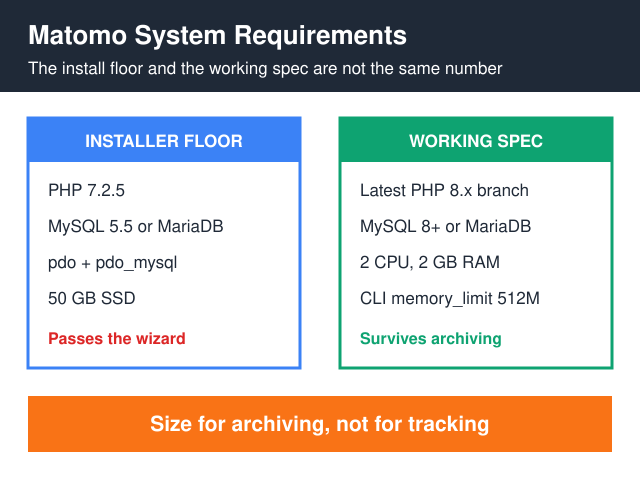
Matomo system requirements come as two numbers, and they are not the same number. The floor — what the web installer accepts before it lets you continue — is PHP 7.2.5, the pdo plus pdo_mysql pair (or mysqli), MySQL 5.5 or MariaDB, and 50 GB of SSD for a site doing up to 100,000 pageviews a month, per Matomo’s own requirements page. The working spec for that same site is 2 CPU cores, 2 GB RAM, a PHP CLI memory_limit of at least 512M, and a cron entry running core:archive.
The distance between those two lines is where self-hosted Matomo installs come apart. Tracking is cheap — the tracker writes a row and returns a pixel. Archiving is not: core:archive recomputes reports over the raw log tables, and Matomo’s documentation states outright that the work is not incremental. So the install passes on the minimum, and then the first full archive over a year of history pins CPU and database at the same moment. Size for archiving, not for tracking.
What does Matomo actually require to install?
This is the floor. Nothing here makes Matomo fast; it only makes the installer stop complaining.
| Component | Minimum | What I’d actually run |
|---|---|---|
| PHP | 7.2.5 — the same value sits in $piwik_minimumPHPVersion in core/testMinimumPhpVersion.php on the 5.x branch |
The latest 8.x branch still getting security fixes (php.net supported versions). Matomo’s own recommendation is “the latest PHP 8.x release” |
| Required extensions | pdo + pdo_mysql, or mysqli. The bootstrap also refuses to start without session, json_encode() and a usable ini_set(), or with mbstring.func_overload switched on |
Same, plus the row below |
| Recommended extensions | Matomo lists GD, cURL, CLI, XML and mbstring | All five. Skipping gd or curl gets you a working install with broken pieces |
| Database | MySQL 5.5 or greater, or MariaDB | MySQL 8+ or MariaDB, which is Matomo’s own recommendation |
| Disk | 50 GB SSD at up to 100K pageviews/month | Same, on NVMe — archiving is I/O-bound as much as CPU-bound |
| Web server | Apache, Nginx, IIS, LiteSpeed | Nginx + PHP-FPM; the walkthrough is in our Matomo self-hosted setup guide |
Notice what that list leaves out: any RAM figure tied to your traffic, and any hint of how long report processing will take on your hardware. Those are the two questions you actually have.
Why the Matomo system requirements page is not a capacity plan
Matomo splits its work into two halves with very different appetites. The tracker (matomo.php) resolves the visitor, writes to matomo_log_visit and matomo_log_link_visit_action, and returns. Short, write-bound, cheap. The archiver (console core:archive) reads those raw tables and builds every aggregated report — day, week, month, segment, per site — into the matomo_archive_* tables.
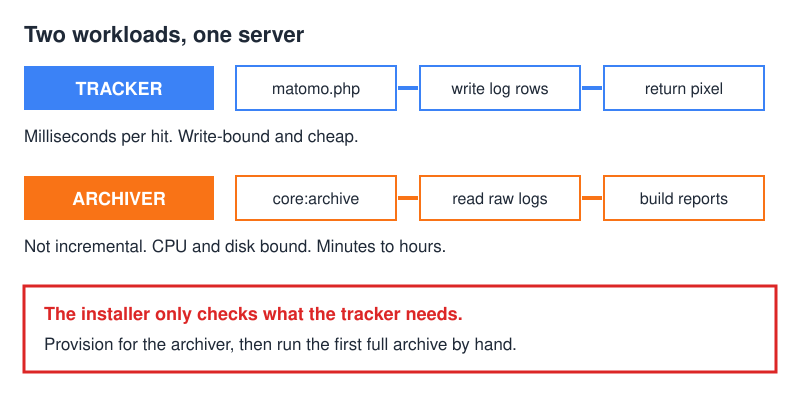
Matomo’s auto-archiving FAQ is unusually honest about the cost. Archiving “is not incremental”, it says — “running the archiving several times per day will not lower the memory requirement for weeks, months or yearly archives.” A run “generally… completes in a few minutes when your site is new”, and “as you acquire more data, it may take a couple dozen minutes”. The same page puts numbers on memory: “Sites with less data or fewer features enabled can use 512M or 2G”, while “8G is a common size for a medium to large Matomo instance.”
Two consequences follow. First, the worst moment of your Matomo life is the first archive after a bulk import. With no history behind it, a run takes minutes. Import eighteen months of server logs, though, and every day, week, month and year period gets built in a single pass — that is precisely when a 2 GB box starts swapping and the run dies halfway through.
Second, never let the browser trigger archiving on a live site. Otherwise one dashboard load can kick off report processing inside a PHP-FPM worker that has a web timeout attached to it, and your visitor watches a spinner while the server burns. Hand the job to cron instead:
[General]
browser_archiving_disabled_enforce = 1
Then add the hourly cron entry Matomo documents, calling console core:archive as the web user. Here is the habit I’ve kept on every box I’ve set up: run that first full archive by hand, in a terminal, watching top. You learn your real archiving window in one evening — instead of discovering it three weeks later, when reports have quietly stopped updating and nothing in the dashboard says why.
How much RAM, CPU and disk by traffic volume?
Matomo publishes hardware tiers by monthly pageviews. Below I’ve reproduced them and added the two columns the page leaves out: the CLI memory limit the archiver wants, and what the archiving window feels like at that size.
| Monthly pageviews | Matomo’s published spec | CLI memory_limit |
What archiving feels like |
|---|---|---|---|
| Up to 100K | 2 CPU, 2 GB RAM, 50 GB SSD — one server | 512M | Minutes per run while history is short |
| Up to 1M | 4 CPU, 8 GB RAM, 250 GB SSD — one server still enough | 512M holds; I move to 2G before the first full archive | Tens of minutes once a year of data has built up |
| Up to 10M | App: 8 CPU, 16 GB, 100 GB SSD · DB: 8 CPU, 16 GB, 400 GB SSD | 2G, heading toward 8G | Hours; the cron window needs planning |
| Up to 100M | App: 3 × 16 CPU, 16+ GB, 100 GB SSD · DB: 16 CPU, 32 GB, 1 TB SSD | 8G — Matomo’s “medium to large” figure | Continuous; treat archiving as a service, not a cron job |
The server column is Matomo’s, taken straight from the requirements page. The memory column uses Matomo’s own documented figures — 512M or 2G for sites with less data, 2G on the high-traffic settings page, 8G for a medium-to-large instance — and the last column paraphrases the auto-archiving FAQ. The only judgement I’ve added is which figure to reach for first.
In practice I provision one tier above the table. The extra headroom costs a few dollars a month, and it buys the first full archive, the occasional log import, and an InnoDB buffer pool that isn’t fighting the archiver for the same RAM.
Disk is the number that keeps moving
Raw log rows are only half of your database. The matomo_archive_* tables grow alongside them, and they grow with every extra segment and custom report you define, because Matomo stores each one per period — day, week, month, year. Define five segments and you haven’t added five rows. You’ve added five rows for every period Matomo archives, forever.
Measure growth after month one instead of trusting the tier table indefinitely. Then know the lever that exists: under Administration → Privacy, Matomo can regularly purge old raw visitor logs and old aggregated report data. That is the only setting that meaningfully shrinks a Matomo database back down.
There is a trap in it, and Matomo documents the trap plainly: “If some old logs are deleted from your database, but reports have not been yet processed, the data will be lost forever.” So get cron archiving working and verified first. Only then switch on log purging. Doing it in the other order destroys history that no backup restore brings back, because the reports were never built in the first place.
Which PHP extensions break the install?
The system check names them, but the error text is not always obvious. Swap 8.3 for your branch (php -v will tell you).
- “Class ‘PDO’ not found”, or a red PDO row. The database driver is missing — the one hard stop. On Debian or Ubuntu,
sudo apt install php8.3-mysqlgives you bothpdo_mysqlandmysqli. - An mbstring complaint in the installer. Either the extension is absent, or
mbstring.func_overloadis on — which Matomo’s bootstrap rejects outright. Runsudo apt install php8.3-mbstring, then check the ini value reads 0. - Sparklines and graphs render as broken images. No GD. The install “worked” and every visual is dead.
sudo apt install php8.3-gd. - GeoIP downloads and one-click updates fail quietly. No cURL, and usually no error message either.
sudo apt install php8.3-curl. - Scheduled reports and XML exports throw DOM errors.
sudo apt install php8.3-xml. - Cron archiving does nothing while the web UI is fine. Usually there is no CLI SAPI installed at all — only FPM. Run
sudo apt install php8.3-cli, then verify as the cron user:php -m | grep -E 'pdo_mysql|mbstring|curl|gd|xml'.
That last one catches people who did everything right in the browser. FPM has the extensions, the archiver runs under CLI, and CLI reads its own php.ini — a different file, with different limits, that nobody thought to check.
MariaDB or MySQL — does it matter?
Less than the argument deserves. Matomo’s requirements page supports “MySQL version 5.5 or greater, or MariaDB” and recommends “MySQL 8+ or MariaDB” — a single line, with no preference expressed between the two branches. Configuration is what moves the needle instead.
- InnoDB, not MyISAM. The archiver reads and writes while the tracker keeps writing, so you want row-level locking rather than table locks. On any current MySQL or MariaDB build InnoDB is already the default — the thing to check is an inherited install that was migrated from something older.
max_allowed_packet. Matomo’s high-traffic settings FAQ asks for1Gunder[mysqld], and says you can drop to 512M if you track under 1M actions a month. Set it too small and archiving fails on batched inserts, with an error that blames the query rather than the setting.max_execution_timeandwait_timeout. The same page recommendsmax_execution_time = -1in the CLIphp.iniandwait_timeout = 28800on the database, so that nothing gets dropped mid-archive. It also usesmemory_limit = 2Gfor high-traffic instances.LOAD DATA INFILE. Matomo bulk-loads rows with it rather than inserting one by one — “for improved performance”, as the troubleshooting FAQ puts it. Under mysqli it needsmysqli.allow_local_infile = On, andenable_load_data_infile=0inconfig.ini.phpdisables the feature entirely. Matomo’s line on switching it off: “This is not recommended for medium to high traffic Matomo where this feature should be enabled.”
My honest read: take whichever branch your distribution packages and patches, then spend the argument you just saved on packet size, buffer pool and an NVMe disk.
Shared hosting, VPS or managed?
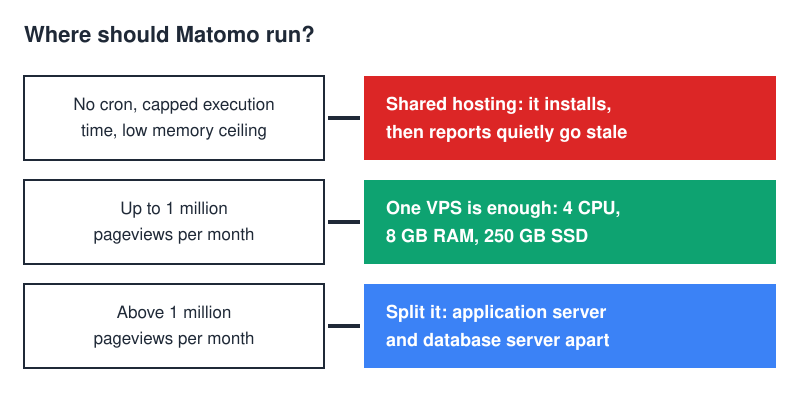
Matomo installs fine on decent shared hosting. It will not archive there, and archiving is the part that matters. Three things break, reliably. Cron is missing, or it cannot call the PHP CLI binary with your own php.ini. Execution time is capped by the host and cannot be set to -1, so long runs get killed mid-flight. And memory ceilings sit below the 512M Matomo names as the entry-level figure for archiving. The install looks healthy for a while, then quietly stops updating reports — with nothing in the interface to tell you.
A sane minimum VPS: 2 vCPU, 4 GB RAM, NVMe, root access, your own cron. The extra 2 GB over Matomo’s official line isn’t padding. It buys first-archive headroom and an InnoDB buffer pool that doesn’t get squeezed the moment the archiver starts.
Above roughly a million pageviews a month, Matomo stops listing a single server as sufficient and moves to a split application-plus-database pair. That is a genuine architectural break rather than a bigger box, and it changes how you deploy, back up and monitor the thing — territory we cover in scaling self-hosted analytics.
Where self-hosting stops paying for itself
There is a point below which the VPS bill plus your own maintenance time costs more than a hosted plan that patches itself, and it arrives sooner than most people expect. The work is nearly identical whether you’re archiving a thousand pageviews a month or a hundred thousand: the same upgrades, the same backups, the same broken cron at the worst possible time. Do that arithmetic honestly against your own hourly rate, not against the sticker price of the server.
And if nobody will own OS updates, Matomo upgrades and backups, then self-hosting becomes a liability rather than a privacy win. An unpatched analytics box holds visitor data and faces the open internet — the exact opposite of what you self-hosted for. The full trade-off is in self-hosted vs cloud analytics.
Pre-install checklist
php -v— an 8.x branch, with the CLI version matching FPM.php -m | grep -E 'pdo_mysql|mbstring|curl|gd|xml|json'— six lines back.mysql --version— MySQL 8+ or a current MariaDB, InnoDB as the default engine.df -handfree -m— disk against the tier table, RAM with room for the buffer pool.memory_limitandmax_execution_time = -1in the CLIphp.ini, not only the FPM one.max_allowed_packetandwait_timeoutinmy.cnf, with the database restarted afterwards.- Cron proven to run
php /path/to/matomo/console core:archiveas the web user — proven, not assumed.
FAQ
What are the minimum Matomo system requirements?
PHP 7.2.5, MySQL 5.5 or MariaDB, the pdo_mysql or mysqli driver, and a supported web server. For a site under 100,000 pageviews a month, Matomo publishes 2 CPU, 2 GB RAM and 50 GB of SSD. Treat all of that as the install floor rather than a capacity plan.
How much RAM does Matomo need?
2 GB is Matomo’s figure for up to 100,000 pageviews a month, and 8 GB up to a million. I treat 2 GB as the install floor and 4 GB as the production minimum, because the archiver alone starts at 512M and MySQL wants a buffer pool that isn’t competing with it.
Which PHP version does Matomo require?
7.2.5 is the hard minimum enforced by Matomo’s bootstrap — and not the version you should install. Matomo recommends the latest PHP 8.x release, and running an 8.x branch that still receives security fixes is the only sensible reading of that advice.
MariaDB or MySQL for Matomo?
Either. Matomo supports MySQL 5.5 or greater and MariaDB, recommending MySQL 8+ or MariaDB without picking a side. Packet size, wait_timeout, buffer pool and an SSD decide your archiving speed far more than the branch does.
Will Matomo run on shared hosting?
It will install. It will not reliably archive, because shared hosts cap execution time and memory and rarely give you usable CLI cron. Reports go stale within days, and the dashboard never says why.
The short version
Read the Matomo system requirements as an installer checklist, not a capacity plan. PHP 7.2.5 and MySQL 5.5 get you through the wizard; 2 GB of RAM and an hourly core:archive get you through the first month; after that, the archiving window is the number to watch. Provision one tier above the published table, run the first full archive by hand while watching top, and turn on log purging only once archiving is verified. The step-by-step build is in our Matomo self-hosted setup guide.